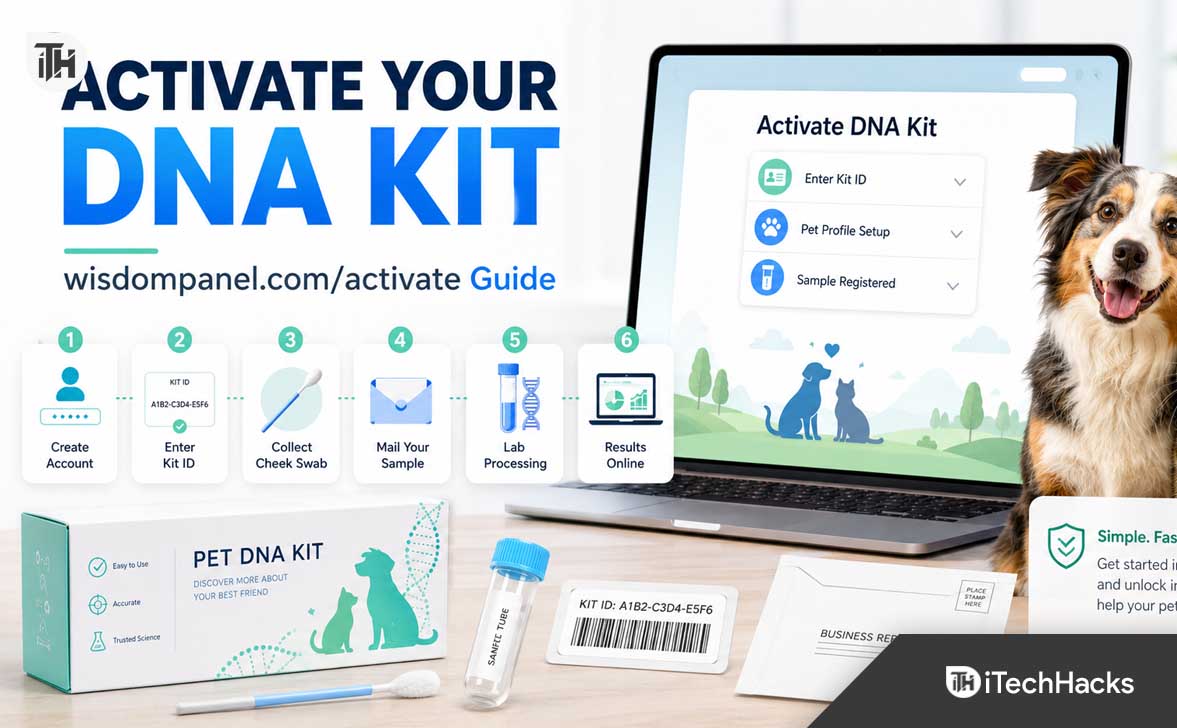
- To activate your Wisdom Panel DNA kit, visit wisdompanel.com/activate and link your kit ID with your online account and pet profile. Activation ensures the lab connects your pet's DNA sample to the correct owner.
- Before activation, have your kit box handy to find the kit ID and use a valid email address to receive results. The activation process involves signing in, entering the kit ID, and adding your pet’s profile details.
- Follow the steps to swab your pet's cheek, let it dry, and use the prepaid mailer to send the sample. After activation and mailing, you can track the sample status in your online Wisdom Panel account to get the digital results within 2 to 3 weeks.
If you recently purchased a Wisdom Panel DNA kit, the most important first step is to activate it online before sending your pet’s sample to the lab. The activation process connects your kit ID with your account, your pet’s profile, and the email address where your results will be delivered. Without activation, the lab may not be able to match the returned sample with the right pet owner.
The official Wisdom Panel activation page is available through the “Activate Kit” option on Wisdom Panel’s website, and the company’s process explains that pet parents collect DNA using a cheek swab, mail the sample with the prepaid mailer, and then view results online after processing.
What Is wisdompanel.com/activate?
wisdompanel.com/activate is the activation page used to register a Wisdom Panel pet DNA kit. When you activate the kit, you connect the physical DNA sample kit to your online Wisdom Panel account. This allows Wisdom Panel to know which pet the sample belongs to and where to send the digital DNA results.
Wisdom Panel offers pet DNA tests for dogs and cats. Depending on the kit you purchased, your report may include breed insights, traits, health information, relatives, behavior insights, or ancestry details. Wisdom Panel’s official product pages mention features such as breed insights, traits, health data, relatives, and behavior information, depending on the test type.
The activation step is not just a formality. It is how your kit ID becomes linked to your pet’s name, age, breed information, and your contact details. If you skip activation and mail the sample first, your results may be delayed because the lab needs a registered kit to process and report results correctly.
Before You Activate Your Wisdom Panel DNA Kit
Before opening wisdompanel.com/activate, keep your DNA kit box nearby. You will usually need the kit ID or sample ID printed on the kit materials. Depending on the kit version, this code may be found on the swab sleeve, collection tube, card, or label included inside the box.
You should also decide which email address you want to use. This matters because your results are connected to your Wisdom Panel account. Use an email address you can access easily, since Wisdom Panel sends account updates and result notifications online.
Before starting, keep these items ready:
- Your Wisdom Panel DNA kit
- The kit ID, sample ID, or activation code included with the kit
- Your email address
- A strong account password
- Your pet’s basic details, such as name, species, age, sex, and approximate weight
- A stable internet connection
If you bought more than one kit, activate each kit separately. Do not mix swabs, kit IDs, or pet profiles. Each physical sample must match the correct online profile.
How to Activate Your DNA Kit at wisdompanel.com/activate
The activation process is simple, but it is worth doing slowly so you do not enter the wrong code or attach the kit to the wrong pet. Follow these steps before collecting and mailing the sample.
Step 1: Go to wisdompanel.com/activate
Open your browser and go to wisdompanel.com/activate. You can also visit the main Wisdom Panel website and choose the “Activate Kit” option. Using the official activation page helps avoid fake login pages, typo domains, or third-party pages that may not register your kit properly.
For best results, use an updated browser such as Chrome, Edge, Firefox, or Safari. If the page does not load, turn off browser extensions temporarily, clear your cache, or try another device.
Step 2: Sign In or Create a Wisdom Panel Account
If you already have a Wisdom Panel account, sign in with your existing email and password. If this is your first kit, create a new account using the email address where you want to receive updates.
Make sure you spell your email correctly. A small typo can stop you from receiving important updates or password reset emails. If you are activating the kit for a family member, use the email address of the person who will manage the results.
Step 3: Enter Your Kit ID or Sample ID
After signing in, enter the kit ID exactly as it appears on your Wisdom Panel kit. Some codes may include letters and numbers, so check carefully before submitting.
Common mistakes include confusing the number 0 with the letter O, the number 1 with the letter I, or entering extra spaces. If the code has hyphens, enter it in the same format shown on the kit unless the page says otherwise.
Step 4: Add Your Pet’s Profile
Next, enter your pet’s details. This usually includes your pet’s name, species, age or birth date, sex, and other basic profile information. This profile is used to organize the report inside your account.
Use the correct pet name if you are testing multiple pets. It is easy to mix kits when activating more than one DNA test, especially if you have two dogs or a dog and cat kit open at the same time. Activate and collect one kit at a time to avoid confusion.
Step 5: Review the Details Before Submitting
Before confirming activation, review the kit ID, account email, and pet profile. Once the sample is sent to the lab, correcting a mixed-up kit can be more difficult.
If everything looks correct, submit the activation form. You may receive an on-screen confirmation or email confirmation. After activation, you can collect your pet’s DNA sample and mail it back.
How to Collect a Good Wisdom Panel DNA Sample
Wisdom Panel’s official process says to swab your pet’s cheek for at least 15 seconds, inspect the mouth for food debris, avoid touching the swab end, firmly roll and rotate the swab inside the cheek, and allow the swabs to dry before mailing.
A clean sample matters because the lab needs enough usable cheek cells to analyze your pet’s DNA. If the swab has food, dirt, too much moisture, or contamination from another animal, processing may be delayed or the sample may need to be recollected.
Step 1: Wait After Feeding
Wisdom Panel recommends waiting at least two hours after your pet eats a meal or treat before collecting a DNA sample. Water is fine, but food particles can contaminate the sample and reduce quality.
This is especially important for puppies, kittens, and pets that recently shared food bowls. If you have multiple pets, separate them for a short period before testing so the sample does not accidentally include DNA from another animal.
Step 2: Open the Swab Carefully
Open the swab packaging only when you are ready to collect the sample. Do not touch the bristle end or allow it to touch tables, clothes, pet hair, or your hands.
The goal is to collect cells from inside your pet’s cheek, not from the outside environment. If the swab touches an unclean surface, it is safer to contact Wisdom Panel support rather than guessing whether the sample is still usable.
Step 3: Swab the Inside of the Cheek
Place the swab between your pet’s cheek and gum. Roll and rotate it firmly against the inside of the cheek for at least 15 seconds. You do not need to scrape hard, but you do need steady contact.
For dogs, it may help to hold the muzzle gently and use your other hand to apply light pressure from the outside of the cheek. For cats, wrapping the body in a towel can help reduce sudden movement and scratches.
Step 4: Let the Swab Dry
After swabbing, let the swab dry for the time recommended in the kit instructions. Wisdom Panel’s current process page mentions allowing swabs to dry for at least five minutes before returning them to the sleeve.
Do not blow on the swab to dry it faster. Breath can introduce moisture or contamination. Let it air dry in a clean area away from other pets.
Step 5: Pack and Mail the Sample
Once the swab is dry, place it back into the correct sleeve or tube as instructed. Use the prepaid mailer provided with the kit if it is included in your region.
Make sure the package is sealed properly before mailing. Keep any tracking number, receipt, or kit ID photo until your sample status appears inside your Wisdom Panel account.
What Happens After You Mail the Sample?
After you mail the sample, it travels to the lab for processing. Wisdom Panel’s process explains that once the lab receives your pet’s DNA, the sample is genotyped, compared against its breed database, and used to create a result breakdown.{index=5}
Wisdom Panel says results are typically available 2 to 3 weeks after the lab receives the sample, not necessarily 2 to 3 weeks from the day you drop the package in the mail. The company also states that results are available in your online account and that no physical report is mailed for the digital product.
You can track your sample by logging in to your Wisdom Panel account and checking the status of the sample. The official Essential product FAQ says users can follow sample progress online through the test tracker by logging in and clicking the sample status.
Why Wisdom Panel Activation Is Important
Activation connects three important pieces of information: your physical kit, your pet’s profile, and your online account. The lab may receive thousands of samples, so the kit ID is what links the sample to the correct report.
Activation also helps you track progress. If your kit is not activated, your online account may not show the sample correctly. This can make it harder to know whether the sample was received, processing, or ready.
It also helps prevent mix-ups when testing multiple pets. If you activate one kit under one pet and accidentally use that swab on another pet, the final report may be assigned to the wrong profile. That is why activation and sample collection should be handled carefully.
Common wisdompanel.com/activate Problems and Fixes
Most users can activate their Wisdom Panel kit in a few minutes. If something goes wrong, the issue is usually related to the kit code, account login, browser, or internet connection.
Problem 1: Kit ID Is Not Working
If wisdompanel.com/activate says your kit ID is invalid, first check the code again. Look closely at similar-looking characters, such as 0 and O, 1 and I, or 5 and S.
Try typing the code manually instead of copying and pasting it. Remove spaces before and after the code. If your kit has a barcode or multiple numbers, make sure you are entering the activation code or sample ID, not a shipping number or lot number.
Problem 2: Kit Already Activated
If the page says the kit is already activated, it may have been registered under another email address. This can happen if a family member started activation earlier or if you bought a second-hand kit.
Check your other email accounts first. If you cannot find the account, contact Wisdom Panel support with your kit ID and proof of purchase. Do not mail the sample until you confirm the kit is connected to your account.
Problem 3: Activation Page Not Loading
If the activation page does not open, refresh the browser and check your internet connection. Then try a different browser or device. Browser extensions, ad blockers, privacy tools, VPNs, or outdated cached data can sometimes break login or form pages.
You can also try opening the page in a private browsing window. If the activation page works there, the issue is likely related to browser cache, cookies, or an extension.
Problem 4: Cannot Sign In
If you cannot sign in, use the password reset option on the login page. Check your spam or promotions folder if the reset email does not arrive within a few minutes.
Make sure you are using the same email address that you used to create the account. If you accidentally created more than one Wisdom Panel account, your activated kit may appear under a different login.
Problem 5: Sample Status Is Not Updating
Sample status does not always update immediately after mailing. The package must reach the lab, be scanned, and enter processing. Shipping delays, weekends, holidays, and regional mail handling can affect timing.
If it has been a long time and your account still does not show movement, use the kit ID and any mail receipt to contact Wisdom Panel. The company lists support contact options on its official contact page, including email, phone, and weekday support hours for the United States.
Best Practices for a Smooth Wisdom Panel Activation
The easiest way to avoid problems is to activate your kit before collecting the sample. This keeps the online registration step separate from the physical sample collection step, making it less likely that you will rush or mix up materials.
Take a photo of the kit ID before mailing the sample. This gives you a backup if the box, card, or label is misplaced. It also makes support easier if you need help later.
Use one kit at a time if you are testing multiple pets. Activate the kit, swab the correct pet, seal the sample, and label everything before opening the next kit. This simple habit can prevent the most frustrating mistakes.
Do not collect the sample immediately after food, treats, nursing, or shared chew toys. Waiting helps reduce contamination and gives the lab a better sample to process.
Finally, keep your account login details safe. Your results are digital, so your Wisdom Panel account is where you will view and manage your pet’s report.
What Can You Learn From a Wisdom Panel DNA Kit?
Wisdom Panel reports vary by kit, but the main goal is to help you understand your pet better. A dog or cat DNA test can reveal breed background, physical traits, ancestry information, and some health-related genetic insights depending on the product purchased.
Wisdom Panel’s official science page says its database screens for over 430 dog breeds and populations and over 70 cat breeds and populations. It also says the company compares pet DNA against a large breed reference database.
For dog owners, breed information can help explain size, coat, behavior tendencies, exercise needs, and inherited traits. For cat owners, it may reveal breed connections, appearance traits, and other genetic insights depending on the selected kit.
Still, DNA results should not replace veterinary advice. If your report shows a health marker or possible risk, discuss it with your veterinarian. A DNA test can provide useful information, but your vet can interpret that information alongside your pet’s age, symptoms, medical history, and physical exam.
Safety and Privacy Tips When Activating Your Kit
Because wisdompanel.com/activate involves account creation, always make sure you are using the official Wisdom Panel site. Avoid clicking suspicious email links, social media ads from unknown pages, or pop-ups claiming to activate your kit.
Create a strong password that you do not use on other sites. If your browser offers to save the password securely, that can make future login easier.
Also, review the account details before submitting. Your pet’s DNA report is personal information about your pet, and you want it connected to the correct owner and email address.
Frequently Asked Questions
Do I need to activate my Wisdom Panel kit before mailing it?
Yes, it is best to activate the kit before mailing the sample. Activation links the kit ID with your account and pet profile, which helps the lab match the sample to the correct report.
Where do I find my Wisdom Panel kit ID?
The kit ID or sample ID is usually printed on the materials included in the DNA kit, such as the swab sleeve, tube, label, or activation card. Check all kit materials carefully before contacting support.
How long does Wisdom Panel take after activation?
Activation itself usually takes only a few minutes. The result timeline starts after the lab receives your pet’s DNA sample. Wisdom Panel states that results are generally available 2 to 3 weeks after the lab receives the sample.
Can I activate two Wisdom Panel kits on one account?
Yes, you can usually manage multiple pets under one account, but each kit must be activated separately. Make sure each kit ID is connected to the correct pet profile before collecting and mailing samples.
What if I entered the wrong pet information?
If you notice the mistake before mailing the sample, log in and check whether you can edit the pet profile. If you cannot fix it yourself, contact Wisdom Panel support before sending the sample.
Can I test a puppy with Wisdom Panel?
Wisdom Panel’s official FAQ says dogs of all ages can be tested, but it recommends waiting until a puppy has been weaned to reduce the risk of cross-contamination from the mother’s milk.
Will I receive a printed Wisdom Panel report?
Wisdom Panel states that results are available in the online account and that no physical report is mailed for the digital product. Some reports may offer an option to download and print a technical report from the account.
What should I do if wisdompanel.com/activate is not working?
Try refreshing the page, using another browser, clearing cookies, disabling extensions, or switching devices. If the problem continues, contact Wisdom Panel support with your kit ID, email address, and proof of purchase.
Final Thoughts
Using wisdompanel.com/activate is the first and most important step after buying a Wisdom Panel DNA kit. It connects your physical kit with your online account, your pet’s profile, and your result notification email.
Activate the kit before mailing the sample, enter the kit ID carefully, collect the cheek swab after waiting at least two hours after food, let the swab dry properly, and use the prepaid mailer if included. Once the lab receives the sample, you can track progress from your Wisdom Panel account and wait for your digital results.
ALSO READ:
- TechronAdvantageCard.com/Activate: How to Activate Your Techron Advantage Card
- How to Activate a New Rogers SIM Card on Phone or Online
- How to Activate Aetna Nations Benefits Card at aetna.nations benefits.com (2026)
- How to Activate Joker Visa Card & Check Balance at jokercard ca
- How to Activate Sportsnet TV Code at Watch.sportsnet.ca