

- WhatsApp has introduced a feature called Message Text Actions that adds dotted underlines to recognized text like phone numbers, dates, addresses, and email addresses in messages, turning them into useful shortcuts. This allows you to quickly perform actions like making calls, adding contacts, creating calendar events, or opening locations in Maps without leaving the chat.
- The feature is gradually being rolled out to both Android and iPhone users. It automatically highlights actionable text, and users can tap the dotted-underlined text to access a menu of actions related to the detected information, like calling a number or adding a date to the calendar.
If you recently noticed dotted underlines appearing beneath phone numbers, dates, addresses, or email addresses in WhatsApp messages, they are not a display bug. WhatsApp is rolling out a new feature called Message Text Actions that turns certain pieces of text inside conversations into useful shortcuts.
Instead of copying information from WhatsApp and manually opening another app, you can tap the dotted-underlined text to perform related actions. A phone number can be called or added to your contacts, an address can be opened in Maps, and a date can quickly become a calendar event.
The feature is gradually rolling out to WhatsApp users on both Android and iPhone. This guide explains what the new WhatsApp dotted underlines mean, how Message Text Actions work, what you can do with each type of detected text, and what to try if the feature is not appearing on your phone yet.
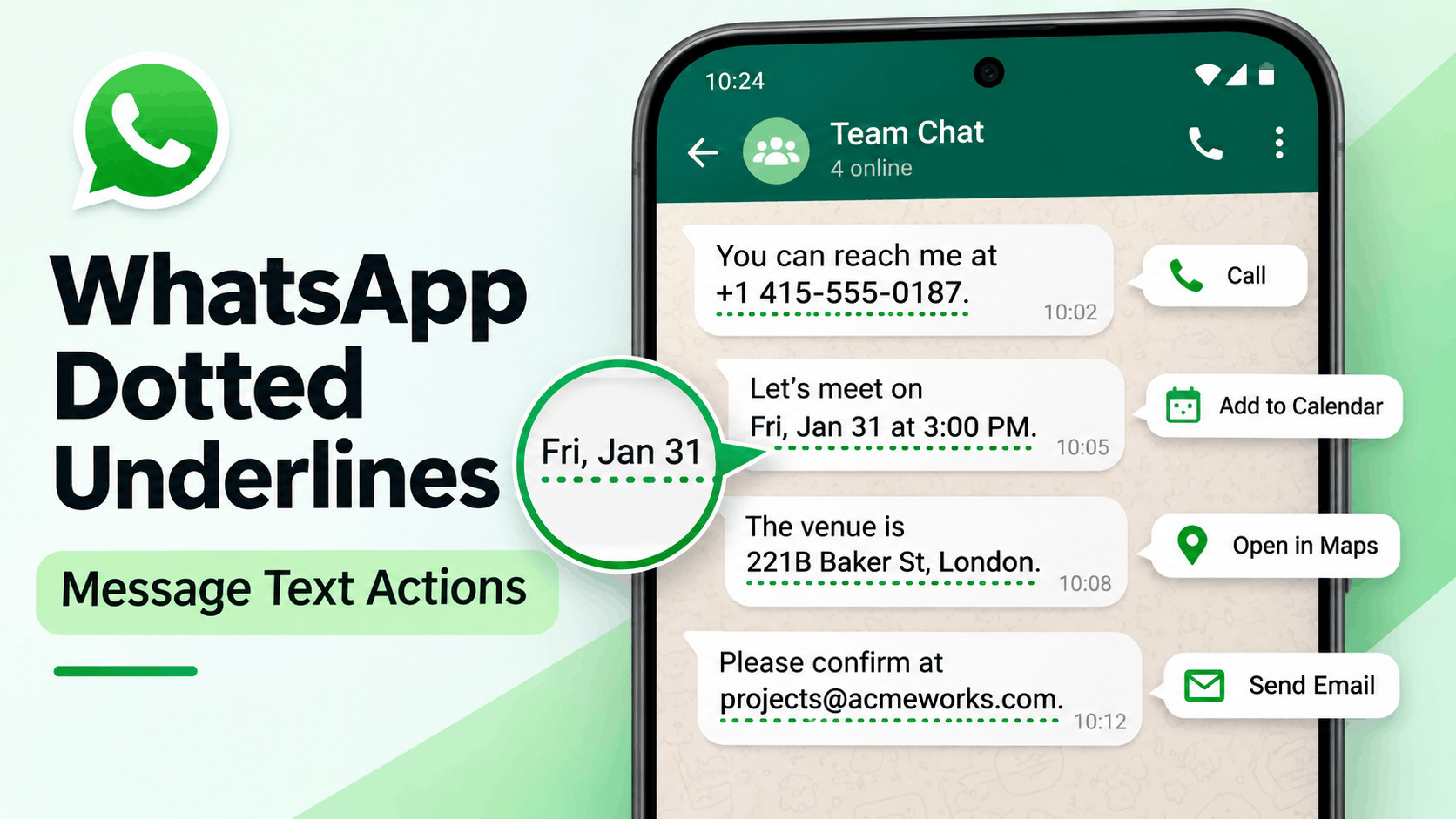
What Are the New Dotted Underlines in WhatsApp?
The dotted underline is WhatsApp’s way of telling you that it has recognized information inside a message that can be used for another action. WhatsApp currently recognizes several common types of text, including phone numbers, dates and times, physical addresses, and email addresses.
When supported information is detected, WhatsApp places a small dotted line underneath it. Tapping the underlined text opens a contextual menu containing actions related to that particular information.
For example, imagine someone sends:
Let’s meet on November 8 at 3:00 PM.
If WhatsApp recognizes the date and time, you may see a dotted underline underneath that portion of the message. Tapping it can give you options to copy the information, add it to your calendar, or create an event.
The feature works with both messages you receive and messages you send. You do not need to enable special formatting while typing the message.
What Is WhatsApp Message Text Actions?
Message Text Actions are contextual shortcuts generated when WhatsApp recognizes certain patterns inside messages. Instead of treating every message as plain text, WhatsApp can identify useful information and provide relevant actions directly from the conversation.
The feature is designed to reduce unnecessary steps. Previously, if someone sent you an address, you might have copied it, opened Google Maps or Apple Maps, pasted the address, and searched for it. Message Text Actions can reduce that process to a couple of taps.
WhatsApp currently supports actions for several important categories:
- Phone numbers
- Dates and times
- Addresses and locations
- Email addresses
The available options depend on what WhatsApp detects and the apps installed on your phone.
How to Use WhatsApp Dotted Underlines
You do not need to activate Message Text Actions from WhatsApp Settings. Once the feature is available for your account, WhatsApp automatically detects compatible information inside conversations.
1. Update WhatsApp
Start by installing the latest available version of WhatsApp. On Android, open the Google Play Store and search for WhatsApp. On iPhone, open the App Store and check the WhatsApp listing.
If an Update button appears, install it. Updating is important because Message Text Actions are being introduced through newer versions of the app.
2. Open a WhatsApp Conversation
Open an individual or group chat containing a phone number, email address, date, time, or physical address.
Compatible text may appear with a dotted underline directly underneath it. The rest of the message should continue to appear normally.
3. Tap the Dotted Underlined Text
Instead of pressing and holding the entire WhatsApp message, simply tap the underlined information.
A popup should appear showing the text WhatsApp detected along with relevant actions.
4. Select the Action You Want
The available options change depending on the detected information. Select the shortcut you need and WhatsApp will either perform the action directly or open the appropriate app on your phone.
WhatsApp Phone Number Text Actions
Phone numbers are one of the most useful examples of WhatsApp’s new Message Text Actions. If someone includes a phone number inside a conversation, WhatsApp can recognize it and place a dotted underline underneath it.
Tap the phone number and you may see options including:
- Copy the phone number
- Add the number to your contacts
- Call the number using your mobile network
- View information about a business number when available
This is especially convenient when someone sends you a restaurant, hotel, delivery driver, office, or customer support phone number. You no longer have to manually select and copy individual digits.
WhatsApp Date and Time Actions
Dates and times can also receive dotted underlines. This is particularly useful when people use WhatsApp to arrange meetings, appointments, trips, parties, or other events.
After tapping a recognized date or time, WhatsApp may provide options to:
- Add the information to your calendar
- Copy the date or time
- Create an event within WhatsApp
For example, if someone sends “Dinner on November 12 at 7 PM”, WhatsApp may recognize the date and time and allow you to create an event without manually entering all of the information again.
The exact options you see can differ depending on your phone, operating system, WhatsApp version, and how clearly the date is written.
WhatsApp Address and Location Actions
Message Text Actions can also recognize certain addresses written as ordinary text. When WhatsApp successfully identifies an address, it may show the new dotted underline underneath it.
Tapping the address can provide shortcuts such as:
- Copy the address
- Open the location in a maps app
This saves several steps when someone sends you the address of a shop, office, restaurant, hotel, event venue, or meeting point.
Keep in mind that WhatsApp has to recognize the text as an address first. An incomplete location such as “near the big market” may not trigger Message Text Actions, while a properly written street address is more likely to be detected.
WhatsApp Email Address Actions
Email addresses can receive the dotted underline too. Tapping a recognized email address can provide shortcuts for opening your email application or copying the address.
You may see options to:
- Open the email address using your default mail app
- Copy the email address
This can be useful when someone shares a business contact or support email through WhatsApp and you need to continue the conversation by email.
Are WhatsApp Dotted Underlines the Same as Text Formatting?
No. The new dotted underlines should not be confused with WhatsApp’s text formatting features.
WhatsApp already supports formatting such as bold, italic, strikethrough, monospace, lists, quotes, and inline code. Those features change how a message looks and are normally applied while composing the message.
Message Text Actions are different. The dotted underline is automatically added by WhatsApp after it recognizes actionable information.
You also cannot create the dotted underline by surrounding text with underscores. Using an underscore around text in WhatsApp creates italic formatting, not the new Message Text Actions underline.
Why Are Dotted Underlines Not Showing in WhatsApp?
If another person has Message Text Actions but you do not, there may be nothing wrong with your phone. WhatsApp is rolling out the feature gradually rather than enabling it for everyone simultaneously.
Update WhatsApp to the Latest Version
Check Google Play or the App Store and install any available WhatsApp updates. Running an older build can prevent newer features from appearing.
Restart WhatsApp
Completely close WhatsApp and reopen it after updating. On Android, you can remove it from the recent apps screen. On iPhone, swipe it away from the App Switcher and open it again.
Try Clearly Written Information
WhatsApp needs to recognize a specific text pattern before it can provide an action. Try receiving or sending clearly structured information such as a complete email address, full phone number, specific date, or recognizable street address.
Unusual formatting or incomplete information may not be detected correctly.
Wait for the Rollout to Reach Your Account
This is currently one of the most important points. Message Text Actions are being introduced gradually on Android and iOS, so installing the latest WhatsApp update does not guarantee immediate access.
WhatsApp can enable features account by account. Two phones running the same WhatsApp version can therefore temporarily show different features.
If you have already updated WhatsApp and still cannot see dotted underlines, it is usually better to wait for the rollout rather than reinstalling WhatsApp or changing unrelated phone settings.
Do WhatsApp Message Text Actions Affect Privacy?
According to details available about the rollout, WhatsApp detects compatible text locally on your device. Pattern matching is used to recognize formats such as phone numbers, dates, addresses, and email addresses without sending the message content to WhatsApp specifically for this feature.
As a result, using Message Text Actions does not change the end-to-end encryption protecting personal WhatsApp conversations.
WhatsApp may also show an option asking whether a detected text action was useful. Feedback can help improve recognition, but the feedback mechanism is designed to report whether the detection was useful rather than sending the actual contents of your private message as part of that report.
Can You Disable WhatsApp Dotted Underlines?
There is currently no widely available dedicated setting for manually switching Message Text Actions on or off. The dotted underline appears automatically when WhatsApp detects supported information.
You are not required to use it. If you see dotted-underlined text and do not want any suggested action, simply ignore it and continue using the conversation normally.
The underline does not change the message itself, and tapping it is optional.
Tips for Using WhatsApp Message Text Actions
Message Text Actions are fairly straightforward, but a few practices can make the feature more reliable.
- Write complete dates: Something like “November 15 at 4 PM” is easier to identify than vague wording such as “later next week.”
- Include complete addresses: Adding a street, city, or other location information can improve recognition.
- Use standard phone number formats: Include the country or area code when appropriate.
- Check detected information before acting: Confirm that WhatsApp recognized the correct date, number, or address before creating an event or making a call.
- Keep WhatsApp updated: Feature availability and detection accuracy can improve through future releases.
Frequently Asked Questions About WhatsApp Dotted Underlines
Why is WhatsApp underlining text with dots?
WhatsApp uses dotted underlines to indicate that it has detected information that supports a contextual action. This can include phone numbers, dates and times, addresses, and email addresses.
What happens when I tap dotted text in WhatsApp?
A popup appears with actions related to the detected information. Depending on the text, you may be able to call a number, add a contact, open an address in Maps, create a calendar event, compose an email, or copy the information.
Are WhatsApp dotted underlines available on Android?
Yes. Message Text Actions are rolling out to WhatsApp users on Android. Availability is gradual, so some Android users may receive the feature before others.
Are WhatsApp Message Text Actions available on iPhone?
Yes. The feature is also being rolled out to WhatsApp for iOS. Make sure the latest WhatsApp version available for your iPhone is installed.
Can I manually add a dotted underline in WhatsApp?
No. Message Text Action underlines are automatically generated when WhatsApp recognizes supported information. They are not a normal text formatting option.
Why does my friend have WhatsApp dotted underlines but I do not?
WhatsApp frequently rolls out features gradually. Your friend’s account may have already received Message Text Actions while your account is still waiting for activation, even if both phones are using the same app version.
Do dotted underlines mean someone has read or tracked my message?
No. The dotted underline is simply an indicator that WhatsApp recognizes actionable information inside the message. It is unrelated to read receipts, message tracking, or the blue tick system.
Final Thoughts
WhatsApp’s new dotted underlines are part of the Message Text Actions feature, designed to make common tasks faster without requiring users to copy information between apps. Phone numbers can become calling or contact shortcuts, addresses can open in Maps, email addresses can launch your mail app, and dates can quickly become calendar or WhatsApp events.
The feature is rolling out gradually across Android and iPhone, so you may not see it immediately even after updating WhatsApp. If dotted underlines have already appeared in your chats, simply tap the underlined text to see the available actions.
If they are not showing yet, install the latest WhatsApp update and give the rollout some time. There is usually no need to reinstall the app or change your phone settings. Once enabled for your account, Message Text Actions should appear automatically whenever WhatsApp recognizes compatible information inside a conversation.