

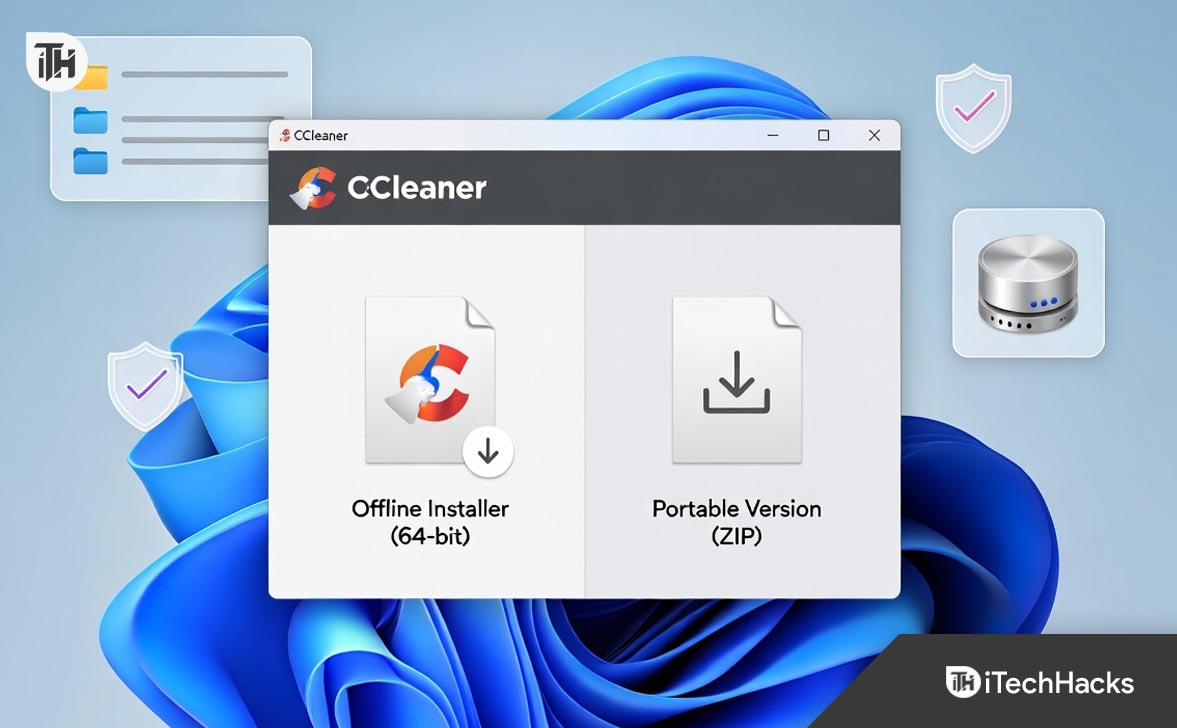
- For many years, CCleaner has been popular for cleaning and speeding up Windows computers by removing space-wasting files and protecting privacy. Users can choose the offline installer to avoid unnecessary software or use it on computers without internet access.
- The standard installer requires an internet connection and sometimes includes extra software. The offline installer, often called "Slim" or "Full," contains all necessary files for a safe install without needing the internet.
- CCleaner Portable runs without installation, making it ideal for use on multiple computers via a USB drive, without leaving any traces on the machine. Both the offline installer and portable version help keep your computer fast and clean, with special emphasis on using the 64-bit version for efficiency.
For nearly two decades, CCleaner has been the household name for Windows optimization. Whether you are trying to free up disk space on a sluggish laptop or scrub tracking cookies for better privacy, it remains the go-to utility for millions. However, getting CCleaner onto your system isn’t always as straightforward as clicking a big green button—especially if you want to avoid bundled software or need to install it on a PC without an internet connection.
Most users download the standard “stub” installer, which is a tiny file that requires an internet connection to download the actual program. But what if you are an IT professional managing multiple offline machines? Or a privacy-conscious user who prefers a portable app that doesn’t touch the Windows Registry?
This guide covers everything you need to know about downloading the right version of CCleaner. We will focus specifically on how to find and use the CCleaner offline installer 64 bit, the differences between the Installer and Portable versions, and how to safely deploy them in 2026.
Why You Should Avoid the Standard “Stub” Installer
If you go to the main CCleaner homepage and click “Free Download,” you usually get a small file (around 2MB). This is a web installer or “stub.” When you run it, it connects to Piriform’s servers to download the rest of the files.
While convenient for casual users, the stub installer has downsides:
- Internet Dependency: It fails if the machine doesn’t have an active internet connection.
- Bundled Adware: The standard online installer is often the version that includes offers for other software (like secure browsers or antivirus trials). If you click “Next” too fast, you might install things you didn’t ask for.
- No Archiving: You can’t save the stub on a USB drive to install on other PCs later, because the stub always tries to download the latest version, which requires the internet.
This is why power users and technicians prefer the offline installer (often called the “Slim” or “Full” installer). It contains all the necessary files inside a single package.
Part 1: How to Download the CCleaner Offline Installer (64-bit)
The CCleaner offline installer 64 bit is the gold standard for clean, safe installations. It is a standalone executable (usually around 50MB-70MB) that installs the software without needing to “phone home” during the process.
Finding it can be tricky because the official website often hides it behind the “Builds” page to funnel users toward the standard installer.
Step-by-Step Download Guide
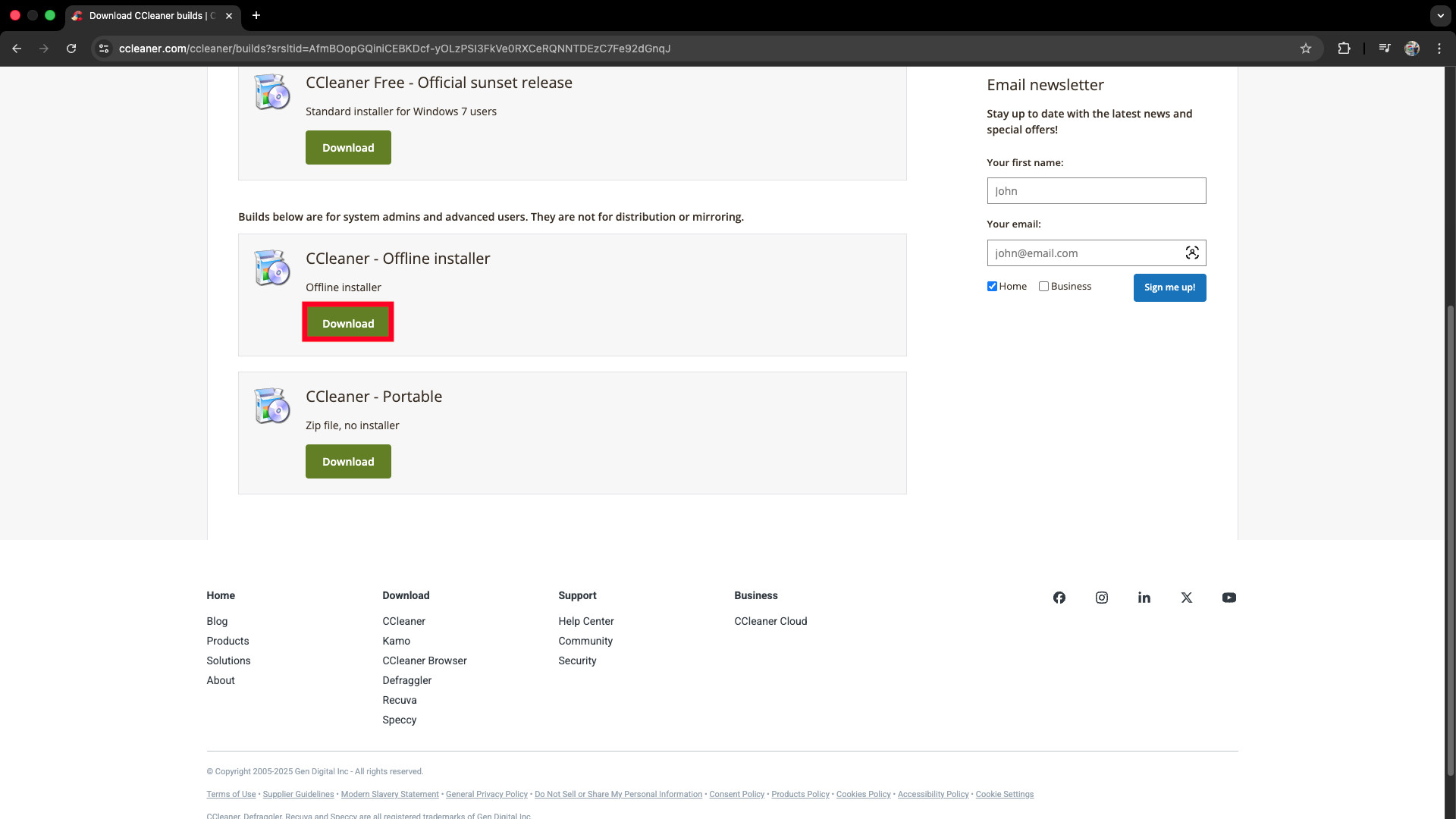
- Visit the Builds Page: Do not use the main download button. Navigate to the official CCleaner Builds page
- Locate the Standard Installer (Offline): Scroll down, and click on the Download button under CCleaner- Offline Installer.

- Verify the Architecture: Modern versions of CCleaner are smart. The installer usually contains both 32-bit and 64-bit files and will automatically deploy the CCleaner offline installer 64 bit binaries if it detects a 64-bit version of Windows 10 or Windows 11.
Why “Slim” is Better
If available, always choose the Slim build. The Slim build is functionally identical to the standard version but is contractually guaranteed not to contain bundled “offers” (adware). This ensures a pure installation experience where you don’t have to uncheck boxes for unwanted browsers.
Part 2: The Portable Version (No Installation Required)
For many users, installing another program just to clean up their computer feels counterintuitive. Enter CCleaner Portable.
What is the Portable Version?
The portable version is a ZIP file containing the pre-compiled program files. You do not install it. You simply unzip it and run the EXE file.
- No Registry Traces: It doesn’t add entries to the Windows Registry or the “Apps & Features” list.
- USB Ready: You can put the folder on a USB flash drive and plug it into any PC to clean it instantly.
- Settings Mobility: If you create a
ccleaner.inifile in the folder, your custom settings travel with the USB drive.
How to Download and Set Up CCleaner Portable
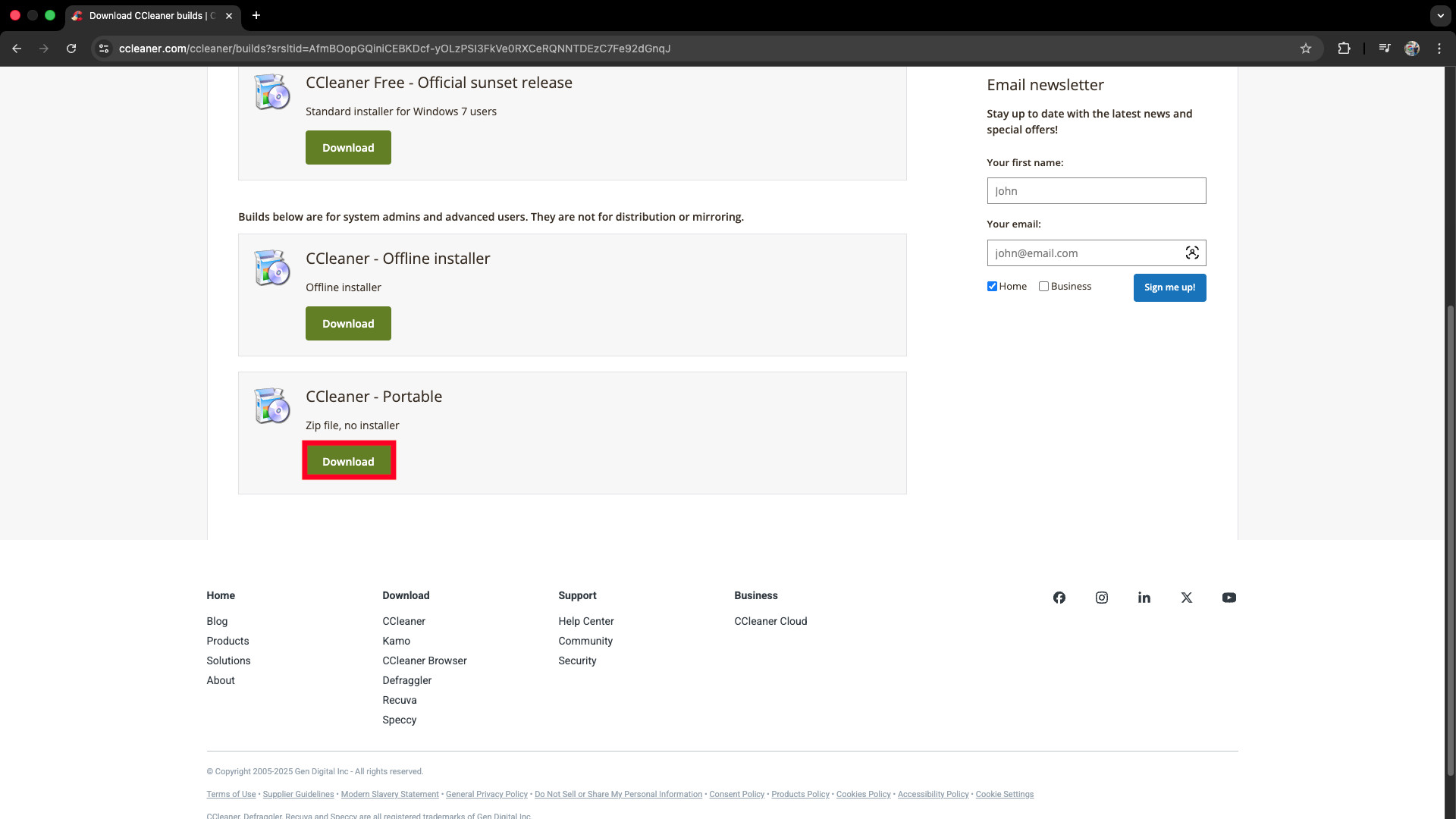
- Go to the same CCleaner Builds page mentioned above.
- Look for the CCleaner – Portable option.
- Download the ZIP file.
- Extract: Right-click the ZIP and select “Extract All.”
- Choose Your EXE: Inside the folder, you will see two main executables:
CCleaner.exe(This is the 32-bit version).CCleaner64.exe(This is the 64-bit version).
- If you are on a modern PC, delete
CCleaner.exeand just keepCCleaner64.exe. Create a shortcut to it on your desktop or USB drive root.
Installer vs. Portable: Which Should You Choose?
Not sure which route to take? Here is a breakdown of the pros and cons to help you decide.
| Feature | Offline Installer | Portable Version |
| System Integration | High (Adds right-click Context Menu options like “Run CCleaner”) | None (Must launch app manually) |
| Updates | Automatic or prompted via notification | Manual (Must download new ZIP) |
| Registry Impact | Adds keys to Windows Registry | Zero impact (Clean) |
| Use Case | Daily driver PC, set-and-forget cleaning | IT troubleshooting, fixing friends’ PCs, privacy |
| Smart Cleaning | Can run in background (System Tray) | Only runs when you open it |
Verdict:
- Use the CCleaner offline installer 64 bit for your own personal computer that you want to keep maintained automatically. The integration with the Recycle Bin context menu (“Run CCleaner”) is a massive time-saver.
- Use the Portable Version for your toolkit USB drive or for work computers where you might not have administrator privileges to install software.
Installation Guide: Installing CCleaner Safely
Even with the offline installer, you should follow best practices to ensure a clean setup.
1. Disconnect Internet (Optional but Recommended)
If you downloaded the standard offline installer (not Slim), disconnecting from the internet before running it ensures that the installer cannot dynamically load any new “sponsored offers” during the setup wizard.
2. Run as Administrator
Right-click the setup file and select Run as administrator. This ensures CCleaner has the permissions needed to write to the Program Files directory and register its service.
3. Customize the Install
Don’t just click the “Install” button. Click Customize at the bottom of the installer window.
- Desktop Shortcuts: Uncheck if you prefer a clean desktop.
- Context Menu: Keep “Add ‘Run CCleaner’ option to Recycle Bin context menu” checked. This is the most useful feature of the installed version.
- Intelligent Cookie Scan: Enable this. It prevents CCleaner from deleting login cookies for sites like Gmail or Facebook, saving you from having to log in again after every cleanup.
4. Post-Install Check
Once installed, go to Options > Smart Cleaning. In the free version, CCleaner often enables “Smart Cleaning” by default, which keeps a background process running to nag you when you have junk files.
- The Pro Move: Uncheck “Enable Smart Cleaning.” You don’t need CCleaner running in the background 24/7 consuming RAM. Just run it manually when you need it.
Troubleshooting: “This app can’t run on your PC”
Sometimes, when trying to run an older CCleaner offline installer 64 bit, Windows Defender SmartScreen might block it.
- The Cause: Microsoft maintains a list of “trusted” certificates. If you are using a slightly older installer or a portable version from a USB drive, Windows might flag it as “unknown.”
- The Fix: Click “More Info” on the blue warning screen and select “Run Anyway.”
- The Verification: To be safe, right-click the installer, go to Properties > Digital Signatures, and ensure it is signed by “Gen Digital Inc” or “Piriform Software Ltd.” If the signature is valid, the file is safe.
Why 64-bit Matters in 2026?
You might wonder why we keep emphasizing the CCleaner offline installer 64-bit.
In the past, 32-bit software was the norm. However, 32-bit apps are limited to accessing only 4GB of RAM. While a cleaning utility doesn’t need massive amounts of RAM, a 64-bit architecture allows CCleaner to:
- Scan Faster: It can process large file systems (like 2TB NVMe SSDs) much more efficiently.
- Access System Files: A 32-bit app running on 64-bit Windows has to go through a translation layer (WOW64) to touch certain system folders. A native 64-bit app has direct access, making the cleaning process safer and more thorough.
If you are running Windows 10 or 11, you are almost certainly on a 64-bit system. Using the 32-bit version of CCleaner is simply inefficient.
Conclusion
Downloading software seems simple, but the devil is in the details. By avoiding the standard web stub and opting for the CCleaner offline installer 64 bit or the Portable ZIP, you gain control over your software. You avoid bundled adware, you ensure the software works without an internet connection, and you keep your system cleaner—which is, after all, the whole point of using CCleaner.
Whether you choose the Installer for its convenient context menus or the Portable version for its stealth and mobility, ensuring you have the correct 64-bit build is the first step toward a faster, optimized PC.
Frequently Asked Questions (FAQs)
1. Is the CCleaner offline installer free?
Yes. The Free edition of CCleaner has an offline installer build available on the official “Builds” page. You do not need to buy the Professional version to get the offline installer.
2. Can I update the Portable version automatically?
No. Since the Portable version is just a folder of files, it cannot update itself. To update, you must download the new ZIP file from the website and overwrite the old files on your USB drive.
3. Is it safe to delete the installer after installing?
Yes. Once CCleaner is installed, the CCleaner offline installer 64 bit file (the .exe you downloaded) is no longer needed. You can delete it to save space, or save it to a backup drive for future use.
4. Why does the offline installer size change?
The offline installer includes all language files and both 32-bit and 64-bit architectures. It is significantly larger (50MB+) than the 2MB online stub installer because it contains everything needed to run independently.
ALSO READ:





![Fix Phone Screen Unresponsive Touch on Android & iPhone [Step-by-Step]](https://itechhacks.com/wp-content/uploads/2025/10/Fix-Phone-Screen-Unresponsive-Touch-150x150.jpg "Fix Phone Screen Unresponsive Touch on Android & iPhone [Step-by-Step]")