- WhatsApp is introducing usernames to enhance privacy by allowing users to connect without sharing their phone numbers, but this feature is gradually being released, so it might not be available for everyone simultaneously, even if the app is up-to-date.
- To reserve a WhatsApp username, you must check your account settings on the WhatsApp mobile app (not the desktop or web app), but if the option is not visible, it's likely that your account hasn't received the feature yet; users should ensure their app is updated and periodically check settings.
WhatsApp usernames are finally on the way, giving users a more private way to connect without automatically sharing a personal phone number. However, many people have opened WhatsApp settings, searched for the new option, and found that the username reservation feature is not showing at all.
If you cannot see an option to create or reserve a WhatsApp username, do not assume your account is broken. WhatsApp is releasing usernames gradually, which means the feature may appear for some users before others, even when everyone is using the latest app version.
This guide explains why your WhatsApp username is not showing, where the reservation option should appear, how to check for it properly, and what you can do while waiting for access.
What Is a WhatsApp Username?
A WhatsApp username is a unique handle that people can use to contact you without needing to know your mobile number. Instead of sharing your number with someone new, you may eventually be able to share a username such as @yourname or @yourbusiness.
The feature is designed to improve privacy, especially when chatting with customers, joining unfamiliar groups, speaking with sellers, attending events, or sharing a contact method publicly. Your phone number will still be required to create and maintain a WhatsApp account, but it may not be shown to new people who contact you through your username.
WhatsApp has also confirmed that usernames will not work like a public social-media directory. People will need to know your exact username to contact you. This should reduce random messages and make it harder for strangers to discover your account simply by searching a name.
Why Is My WhatsApp Username Not Showing?
The most common reason is simple: WhatsApp usernames are rolling out in stages. The feature started appearing through reservations before the full username system becomes widely available later in 2026.
That means your friend, coworker, or family member may see the option before you do, even if you use the same phone brand, live in the same country, and have updated WhatsApp on the same day.
1. The WhatsApp Username Rollout Has Not Reached Your Account Yet
WhatsApp often enables major features through server-side rollouts. In other words, installing the latest app update does not always activate the feature immediately.
Your app may be fully updated, but WhatsApp still needs to enable username reservations for your specific account. This is why deleting and reinstalling WhatsApp usually does not force the option to appear.
Username reservations are expected to roll out over the coming months, so users in some regions or account groups may need to wait longer than others.
2. You Are Looking in the Wrong WhatsApp Settings Area
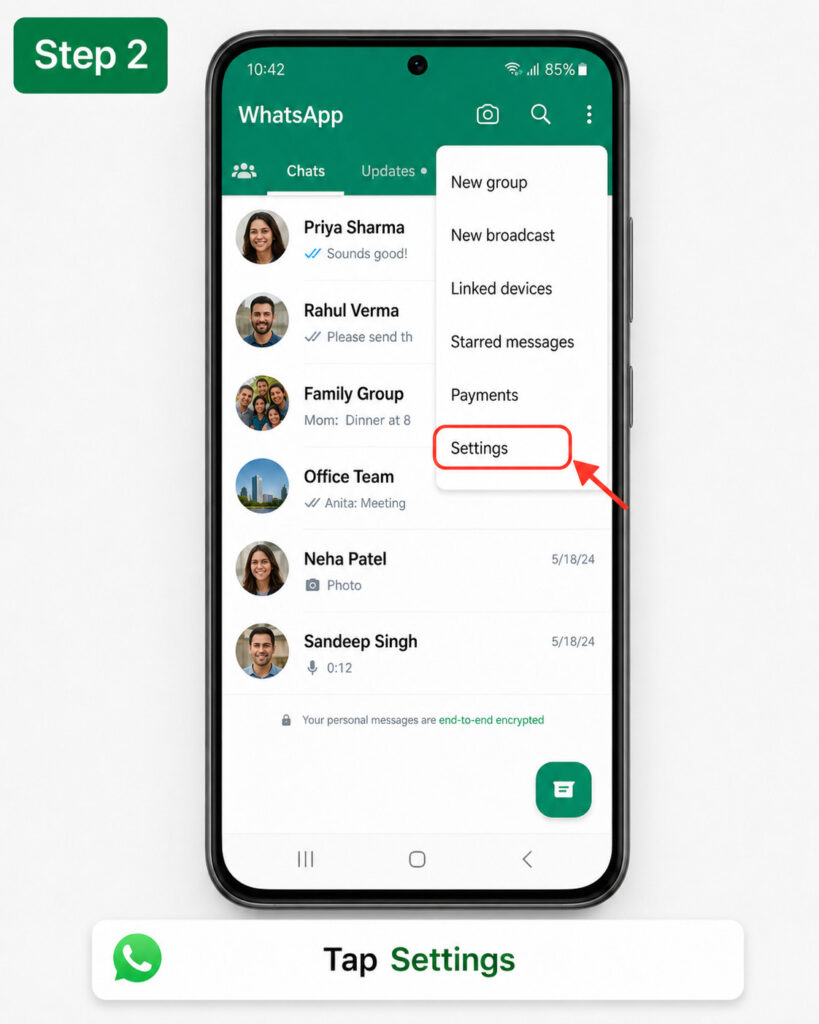
When the feature becomes available, the username option should appear in your account settings. On most Android phones, the expected location is:
Open WhatsApp
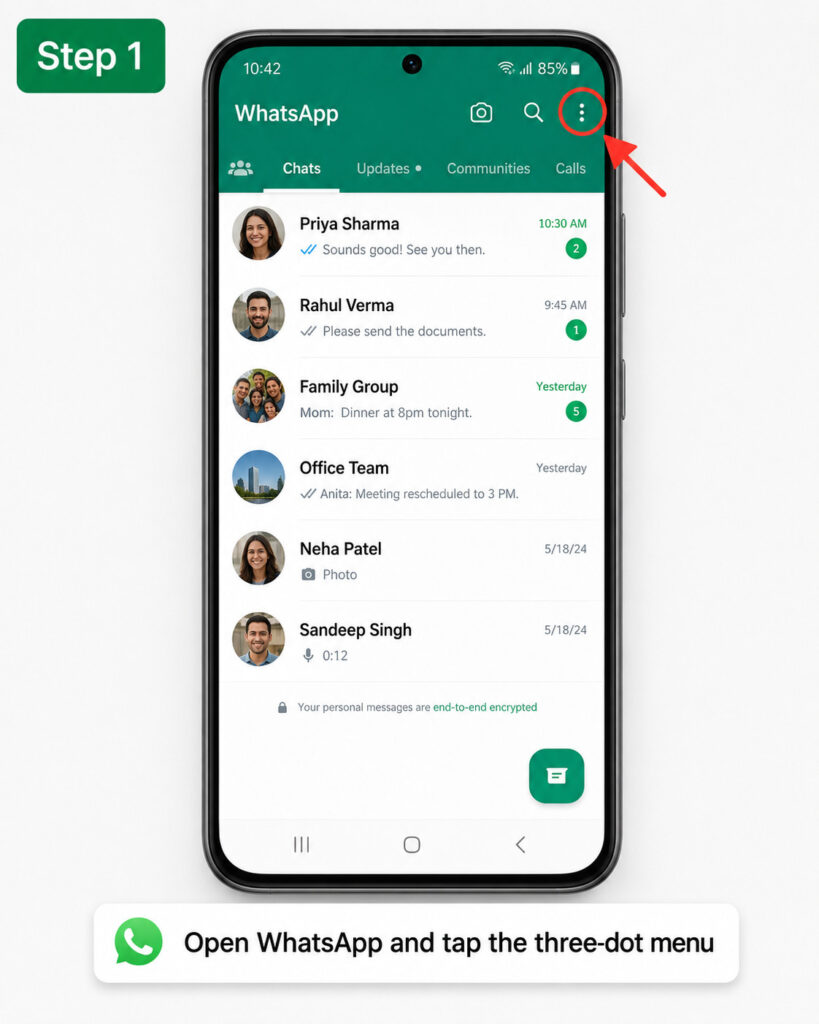
Tap the three-dot menu
Select Settings
Tap Account
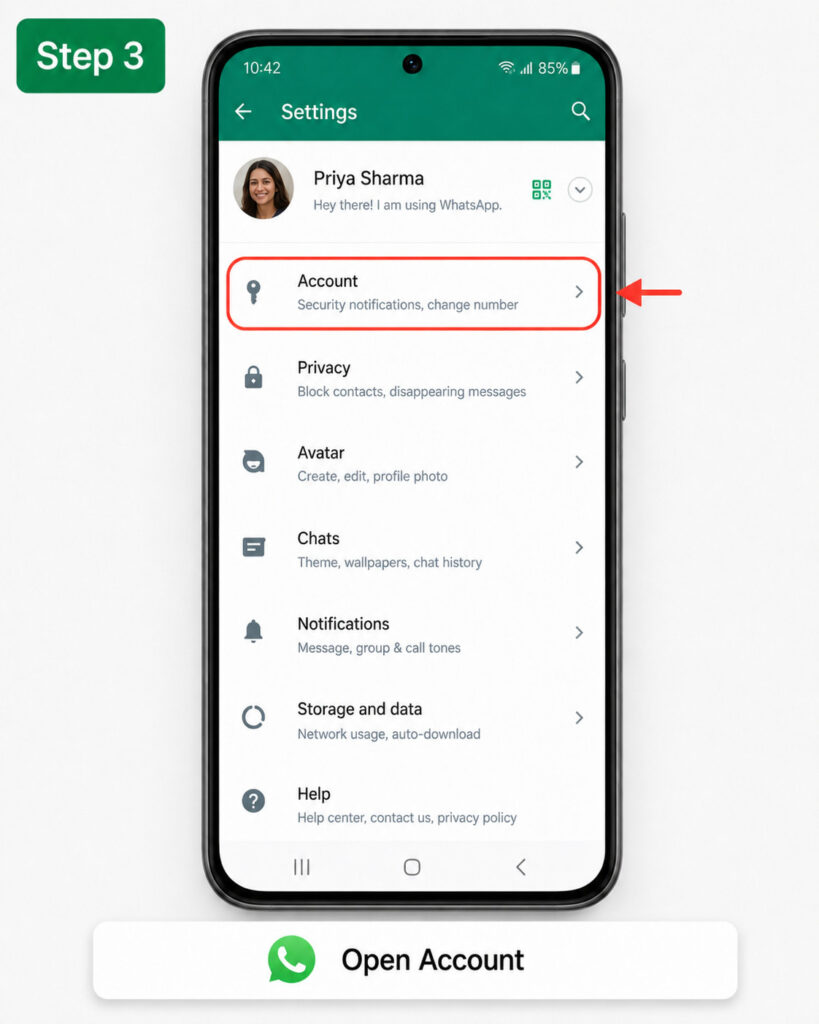
Look for Username
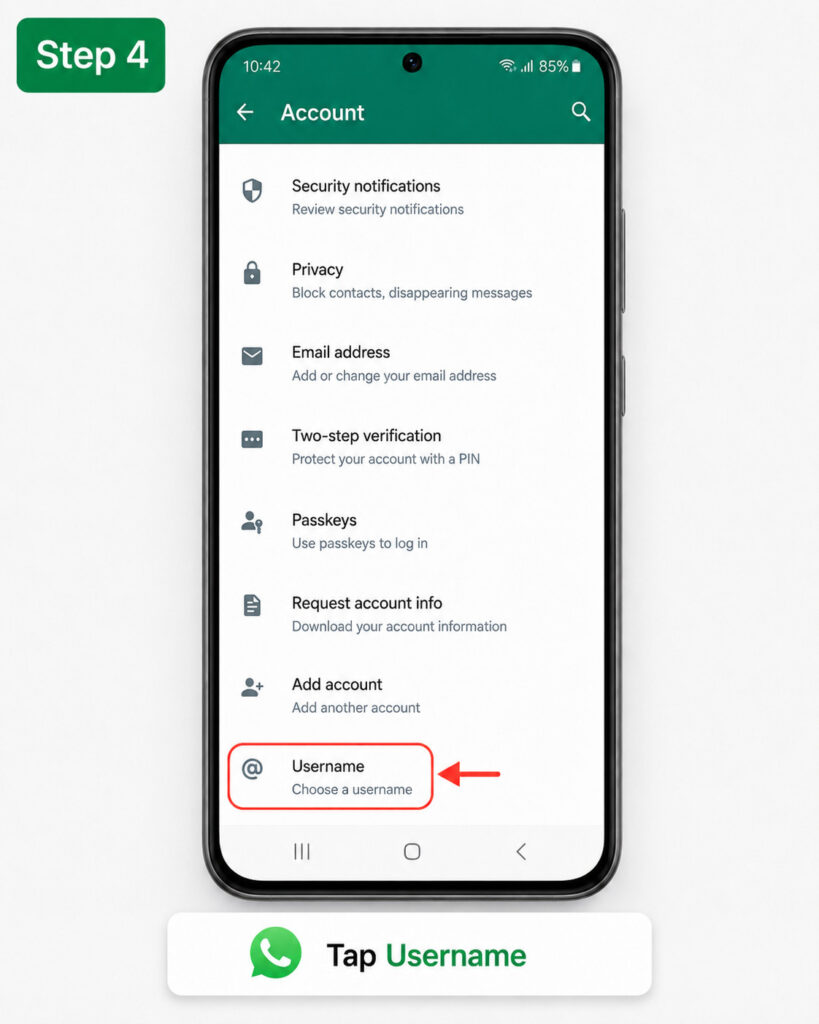
On iPhone, WhatsApp may show the option through your profile section. Open WhatsApp, tap You or Settings, open your profile, and look for an option such as Create Username or Reserve Username.
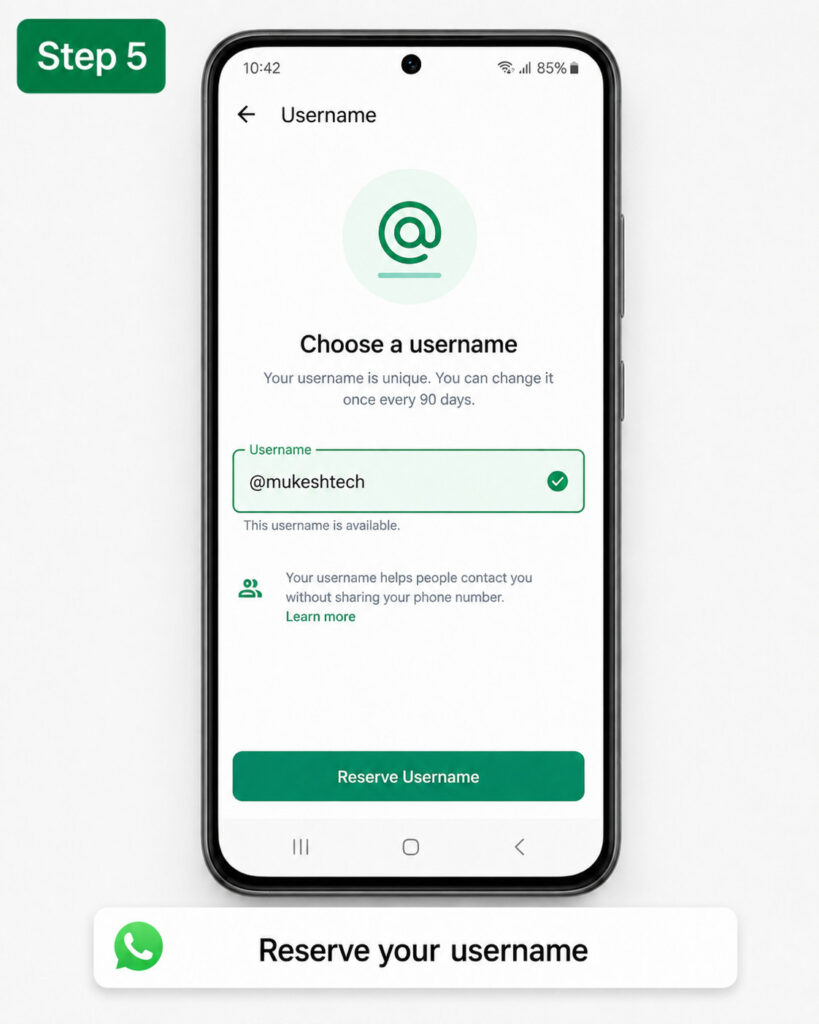
If you do not see either option, the feature is most likely not enabled for your account yet.
3. You Are Using WhatsApp Web or Desktop
One important limitation is that WhatsApp username reservations are not currently available through WhatsApp Web or the desktop app. You need to use your primary WhatsApp account on a mobile phone.
So, if you are checking WhatsApp on Windows, Mac, Chromebook, or a browser tab, you may not see the username setting even if your account is eligible.
Open WhatsApp directly on the Android phone or iPhone that has your main WhatsApp number registered. Then check the account or profile settings again.
4. Your WhatsApp App Is Outdated
Although updating WhatsApp does not guarantee immediate access, it is still an important first step. Older app builds may not include the username reservation screen or the required background support for the feature.
To update WhatsApp on Android, open the Google Play Store, search for WhatsApp, and tap Update if it is available. On iPhone, open the App Store, search for WhatsApp, and install the latest update.
After updating, fully close WhatsApp and open it again. Then return to Settings and check whether the username option has appeared.
How to Check Whether You Can Reserve a WhatsApp Username
Once WhatsApp enables the feature for your account, you should see a username option in the app. Follow these steps to check properly:
- Update WhatsApp from the Google Play Store or Apple App Store.
- Restart your phone if the update was installed recently.
- Open WhatsApp on your primary mobile device.
- Go to Settings > Account.
- Look for Username, Reserve Username, or Create Username.
- Follow the on-screen instructions to choose an available handle.
If the option is visible, reserve your preferred username quickly. Short, brand-friendly, creator-friendly, and common usernames may be claimed early by other users.
Remember that reserving a WhatsApp username does not necessarily mean the full messaging feature is active immediately. WhatsApp is allowing reservations before usernames become widely usable for contacting people.
Seeing the username screen does not guarantee that your first choice will be available. WhatsApp usernames must be unique, so only one account can reserve a particular handle.
For example, names like @john, @travel, @officialstore, or @techsupport may already be unavailable because another user reserved them first.
WhatsApp may also protect certain usernames to reduce impersonation. Names associated with public figures, well-known brands, organizations, creators, government bodies, and major companies may be restricted or reserved for the legitimate owner.
Try These WhatsApp Username Ideas Instead
If your preferred username is taken, avoid adding random symbols that make it difficult to remember. Choose a clean variation that still looks professional and is easy for others to type correctly.
- Add your city or region, such as @mukeshhp.
- Add your niche, such as @mukeshtech.
- Add a business category, such as @digitalwebdiaSEO.
- Use a short word related to your work, such as @brandhelp.
- Add a meaningful number only when needed.
For businesses and creators, try to keep the same username across WhatsApp, Instagram, Facebook, YouTube, and other platforms where possible. A consistent handle makes it easier for people to recognize and trust your brand.
Can You Claim Your Instagram or Facebook Username on WhatsApp?
WhatsApp has introduced an option for eligible users to claim an existing Instagram or Facebook username on WhatsApp. This is especially useful for businesses, creators, organizations, and people who already have an established online identity.
However, this option may not appear for every account immediately. Availability can depend on the rollout stage, the status of your linked Meta accounts, and whether the username meets WhatsApp’s eligibility requirements.
If you want to protect your brand name, make sure your Instagram and Facebook username are accurate, active, and controlled by your business before WhatsApp username reservations reach your account.
What Not to Do While Waiting for WhatsApp Username Access
When a new WhatsApp feature becomes popular, fake apps, unofficial websites, and scam messages often appear quickly. Be careful with any service claiming it can reserve a WhatsApp username for you before the official option appears in the WhatsApp app.
- Do not pay anyone to reserve a WhatsApp username.
- Do not enter your WhatsApp verification code on third-party websites.
- Do not install modified WhatsApp apps to unlock username features.
- Do not share your six-digit login code with anyone.
- Do not trust screenshots claiming that a username is being sold.
WhatsApp username reservations should only be completed inside the official WhatsApp mobile app. Any website, Telegram group, Instagram account, or unknown person offering early access should be treated carefully.
Common WhatsApp Username Problems and Fixes
Username Option Is Missing After Updating WhatsApp
This usually means the rollout has not reached your account. Keep WhatsApp updated, check the settings occasionally, and wait for the in-app notification.
Username Is Showing but You Cannot Reserve It
Your chosen username may already be taken, restricted, or unavailable under WhatsApp’s naming rules. Try a shorter variation without unnecessary punctuation or confusing spelling.
WhatsApp Username Is Not Showing on Desktop
Use WhatsApp on your main Android phone or iPhone. Username reservations are intended for the mobile app, not WhatsApp Web or the desktop client.
You Received a Username Reservation Message Outside WhatsApp
Do not click suspicious links or enter account details. Open WhatsApp manually and check Settings to confirm whether the feature is available.
Frequently Asked Questions
Why can’t I reserve a WhatsApp username yet?
WhatsApp usernames are rolling out gradually. Your account, country, or app version may not have received the reservation feature yet.
Do I need WhatsApp Beta to get a username?
No. WhatsApp usernames are being introduced through the official app rollout. Beta users may sometimes see new features earlier, but joining beta does not guarantee access.
Can I reserve a WhatsApp username on WhatsApp Web?
No. You need to use the WhatsApp mobile app on your primary Android phone or iPhone.
Will people see my phone number after I create a WhatsApp username?
WhatsApp usernames are designed to let you connect with new people without automatically sharing your phone number. Existing contacts and people who already have your number may still be able to see it depending on your account and privacy settings.
Can I change my WhatsApp username later?
WhatsApp is expected to let users manage usernames after the feature launches more broadly. Still, choose a name you will be comfortable using for personal or business communication.
Final Thoughts
If your WhatsApp username is not showing, the most likely reason is that the reservation rollout has not reached your account yet. This is normal, especially during the early stage of a global feature launch.
Keep WhatsApp updated, check the username section from your primary mobile phone, and avoid unofficial tools that promise early access. Once the option appears, reserve a clean, memorable username that matches your personal identity or business brand before someone else claims it.