- If you bought tickets as a guest on StubHub and want to sell them, you need to use the same email connected to your purchase to either log in or create a StubHub account first. This is required to manage your listing and receive payment after selling.
- Before listing tickets for sale, check that they can be transferred and ensure all details, like event date, seat number, and ticket type, are accurate. This prevents issues since incorrect information may lead to fees or disputes.
If you bought tickets on StubHub without creating a full account, you may wonder whether you can resell those tickets the same way. The short answer is yes, you can usually resell tickets bought as a guest, but you will still need to connect the guest purchase to a registered StubHub account before you can list them for sale.
This guide explains how to sell tickets on StubHub as a guest in 2026, what “guest” really means, how to list your tickets, how payouts work, and what to check before you create a listing. StubHub’s own support flow says sellers should log in or create an account to sell tickets, and its guest resale help page directs users who bought as guests to log in to the registered account connected with that purchase.
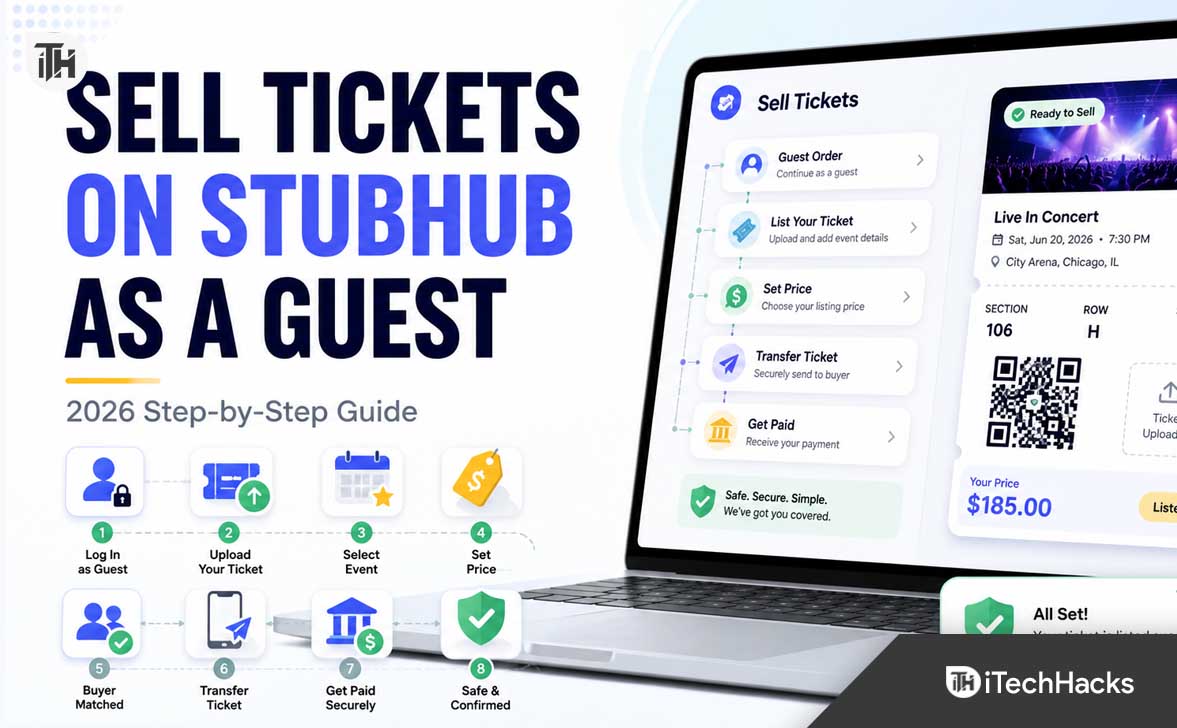
What Does Selling Tickets on StubHub as a Guest Mean?
Selling tickets on StubHub as a guest usually means you originally bought tickets without signing in to a full StubHub account. You may have checked out using only your email address, payment details, and order information. Later, when you decide you cannot attend the event, you want to resell those tickets.
In 2026, StubHub does not work like a completely anonymous classified site. To sell tickets, manage listings, deliver tickets, and receive payment, you need a StubHub account or a registered login connected to your email address. This protects the buyer, helps StubHub verify the sale, and gives you a dashboard where you can track the listing.
So the practical meaning of how to sell tickets on StubHub as a guest is this: use the same email address from your guest order, create or access your StubHub account, find the event, create the listing, deliver the tickets after they sell, and receive your payout after the event.
Can You Sell Tickets on StubHub Without an Account?
No, not in the normal sense. You may have purchased as a guest, but selling requires account access because StubHub needs a way to manage your listing, collect seller information, send buyer delivery instructions, and process payment. StubHub’s selling instructions say to select “Sell,” then log in or create a StubHub account before following the listing steps.
This is important because many users search for “sell tickets on StubHub as a guest” expecting a one-time guest listing option. The safer way to think about it is that guest buyers can become sellers, but they must first connect their purchase email to a StubHub account.
Before You Sell: Check These Things First
Before listing your tickets, make sure the tickets are eligible for resale and transfer. Some venues, teams, artists, or ticket providers may delay ticket delivery, restrict transfer until closer to the event, or require a specific app such as Ticketmaster, AXS, or another ticketing platform.
You should also confirm that your ticket details are accurate. StubHub’s seller policy requires sellers to list valid tickets and says sellers are responsible for making sure listed tickets are valid. Incorrect, misrepresented, invalid, fraudulent, or counterfeit tickets can lead to fees or other consequences.
- Check the event date: Make sure you select the correct date, city, venue, and showtime.
- Check the ticket type: Mobile transfer, PDF, barcode, physical ticket, and AXS transfer may have different delivery steps.
- Check seat details: Section, row, seat number, quantity, and any restrictions must be accurate.
- Check transfer availability: If the original ticket provider has not enabled transfer yet, you may need to choose a later delivery option.
- Check local resale rules: Some states, provinces, countries, venues, or events may have special pricing or resale requirements.
How to Sell Tickets on StubHub as a Guest in 2026
Follow these steps carefully if you bought tickets as a guest and now want to resell them on StubHub.
Step 1: Find the Email Address Used for the Guest Order
Start by opening the confirmation email you received when you bought the tickets. This matters because StubHub usually ties guest purchases to the email address used at checkout. If you create an account with a different email address, your guest order may not appear automatically.
Search your inbox for terms like “StubHub order,” “StubHub tickets,” “order confirmed,” or the event name. Also check spam, promotions, and updates folders if you cannot find the original email.
Step 2: Create or Log In to a StubHub Account
Go to StubHub and log in using the same email address from your guest purchase. If you do not already have a password, create an account using that email address. This should help connect your guest purchase history with your StubHub profile.
This step is the key difference between buying as a guest and selling as a guest. You are not creating a new unrelated seller profile. You are turning the guest purchase email into a usable account so StubHub can identify your order and manage the resale process.
Step 3: Look for Your Tickets or Start from the Sell Page
Once logged in, check your orders or tickets section. If the tickets were bought on StubHub and resale is supported, you may see an option such as “Can’t attend? Sell your ticket.” StubHub’s resale support says users can go to Orders, choose the order details, select the resale option, set a price, and review the expected payout.
If you do not see your order, use the main “Sell” option from the StubHub homepage or event page. Search for the event by artist, team, venue, or event name. Be careful to select the exact event date and location, especially for tours, playoff games, festivals, and multi-day events.
Step 4: Choose the Correct Ticket Type
StubHub will ask what kind of tickets you are listing. Choose the option that matches your actual tickets. For many 2026 events, tickets are mobile transfer tickets, meaning you must transfer them from the original ticket provider to the buyer after the sale.
StubHub’s help page for mobile transfer and AXS tickets explains that these ticket types require sellers to transfer tickets through the original vendor used to purchase them.
- Mobile transfer: Tickets are transferred through another ticketing account, often using the buyer’s email address.
- AXS tickets: You may need to use your AXS account to complete the transfer.
- PDF tickets: You may upload the ticket file if StubHub allows that delivery type for the event.
- Physical tickets: You may need to ship the tickets, but this depends on the event and listing options.
- Tickets not ready yet: If you do not have the tickets yet but know you will receive them, StubHub may let you select a later delivery option for some events.
Step 5: Enter Accurate Seat and Ticket Details
Enter the section, row, seat numbers, quantity, and any special notes. If your tickets have an obstructed view, wheelchair-accessible seating, limited access, age restrictions, VIP package limitations, or parking-only access, do not hide that information.
Accuracy matters because buyers depend on your listing details. If you list the wrong section or deliver different tickets than described, the sale can be disputed and your payout may be affected.
Step 6: Set Your Ticket Price
StubHub lets sellers set their own ticket price. StubHub’s 2026 newsroom guide explains that sellers create listings and choose the price, while StubHub may provide pricing recommendations based on comparable listings and historical data.
When pricing your tickets, check similar listings for the same event, section, row, and delivery type. Do not price only based on what you paid. Demand changes quickly. A sold-out concert may sell above face value, while a weekday game or low-demand event may need to be priced below face value to move.
- For high-demand events: Check prices often, but avoid unrealistic pricing that prevents the listing from selling.
- For events happening soon: A competitive price can help you sell before transfer deadlines become stressful.
- For common seats: Look at the cheapest comparable listings, not just the average price.
- For premium seats: Mention important benefits clearly if StubHub gives you a field for notes.
Step 7: Review Seller Fees and Expected Payout
It is free to list tickets on StubHub, but StubHub collects a seller fee if your tickets sell. StubHub says fees can adjust based on factors such as ticket price, time to event, updated event information, supply, demand, ticket availability, and marketing costs.
Before publishing, look at the expected payout instead of only the listing price. The listing price is what the buyer sees before applicable fees, while the expected payout is closer to what you receive after StubHub’s seller fee.
Step 8: Add Your Payout Method
You need a payout method before you can receive money from the sale. StubHub’s payment support says sellers can add a new payment method under payout options and choose bank transfer.
For U.S. sellers, tax information is also important. StubHub’s 1099-K support says that starting January 1, 2025, U.S. sellers are required to provide a Tax Identification Number to receive payment under state and federal tax laws.
Step 9: Publish the Listing
Review everything one final time before publishing. Confirm the event, date, venue, ticket quantity, seats, ticket type, delivery method, price, payout method, and seller details.
Once published, your listing can appear to buyers browsing that event. You can usually manage or edit active listings from your StubHub account. StubHub’s listing edit support says sellers can go to Listings, find the listing, and choose “Edit listing” to change eligible details.
Step 10: Deliver the Tickets After They Sell
When your tickets sell, StubHub will notify you and provide delivery instructions. Follow those instructions exactly. If your tickets are mobile transfer tickets, you may need to open the original ticketing app or website and transfer the tickets to the buyer’s provided email address.
StubHub’s delivery support says sellers get paid after delivering tickets correctly, and payout is typically processed within 8 business days after the event.
What If Your Guest Tickets Do Not Show in Your StubHub Account?
If you created an account with the same email address but still cannot find your tickets, do not immediately create another listing from scratch. First, check whether the tickets were actually purchased on StubHub, whether you used a different email, or whether the order confirmation came from another platform.
Also check whether you are using the correct StubHub region. StubHub has country-specific sites and international versions. If you bought tickets on one regional site and log in to another, your order may not appear as expected.
- Search your inbox: Confirm the exact email used for the order.
- Reset password: Use the guest order email and reset the password if needed.
- Check all StubHub accounts: You may have used Apple, Google, PayPal, or another sign-in option earlier.
- Check event restrictions: Some tickets may not be eligible for resale through StubHub.
- Contact StubHub support: Use your order number and guest purchase email so support can locate the order.
Can You Sell Tickets You Bought Somewhere Else?
Yes, in many cases you can sell tickets on StubHub even if you bought them from another ticket provider, as long as the tickets are valid, transferable, and allowed for resale. You would use the Sell option, search for the event, enter the ticket details manually, choose the correct delivery method, and publish the listing.
The key is transferability. If the original ticket provider does not allow transfer, the ticket may be impossible or risky to sell. Never list tickets unless you are confident you can deliver them by StubHub’s deadline.
How Payouts Work When You Sell Tickets on StubHub
StubHub does not usually pay sellers immediately after the buyer pays. Payouts are typically processed after the event, once StubHub can confirm there were no ticket delivery or entry problems. StubHub’s support says payouts are typically processed within 8 business days after the event.
This delay can surprise first-time sellers, especially guest buyers who expected instant payment. The reason is buyer protection. StubHub wants to make sure the buyer received the correct tickets and could use them successfully.
To avoid payout delays, add your payment method early, complete any required tax details, deliver tickets on time, and keep proof of transfer. For mobile transfers, save confirmation emails or screenshots from the original ticket provider showing that the transfer was sent to the correct buyer email.
Best Practices to Sell StubHub Guest Tickets Faster
Price Based on Real Competition
Search the same event like a buyer. Look at your section, nearby rows, and similar ticket quantities. If there are many cheaper listings around you, your tickets may sit unsold unless your seats are clearly better.
Do Not Wait Too Long
Some tickets sell best close to the event, but waiting can be risky if transfer deadlines are short or demand drops. If you already know you cannot attend, listing earlier gives your tickets more time to be seen.
Keep Your Email Active
StubHub will send important sale and delivery notifications by email. If you bought as a guest, use that same inbox and check it regularly after listing.
Be Honest About Restrictions
If your ticket has a limited view, age restriction, companion seat rule, or VIP benefit that may not transfer, disclose it correctly. A clean, accurate listing reduces disputes.
Keep Transfer Proof
After transferring mobile tickets, keep confirmation emails, screenshots, and timestamps. This helps if there is any confusion later about whether you delivered the tickets.
Common Problems and Fixes
Problem: I Bought as a Guest and Cannot Log In
Use the same email address from your StubHub order and try the password reset option. If the account does not exist, create a new account with that email. Then check whether your order appears under Orders or Tickets.
Problem: StubHub Says My Tickets Are Not Eligible for Resale
The event, venue, artist, team, or ticket type may have resale restrictions. You can check whether transfer is available in the original ticketing account. If transfer is blocked, you may not be able to sell safely.
Problem: I Do Not Have the Tickets Yet
Some events release tickets closer to the event date. StubHub may allow later delivery for certain listings, but you should only list tickets you know you will have. StubHub’s support specifically warns sellers to list only tickets they know they will receive.
Problem: I Entered the Wrong Seat Details
Go to your active listings and edit the listing if StubHub allows the change. If the tickets already sold, contact StubHub support quickly before delivering anything incorrect.
Problem: My Tickets Sold but I Cannot Transfer Them
Check the original ticket provider first. Sometimes transfer opens closer to the event. If transfer is still unavailable and your delivery deadline is near, contact StubHub support instead of ignoring the sale.
Problem: I Have Not Been Paid Yet
Check whether the event has already happened, whether 8 business days have passed, whether your payout method is valid, and whether your tax information is complete. Payouts are usually processed after the event, not immediately after the buyer purchases.
Important 2026 Notes for StubHub Sellers
First, seller account details matter more than ever. If you are in the U.S., complete tax information early because StubHub says U.S. sellers must provide a Tax Identification Number to receive payment starting from January 1, 2025.
Second, fees can vary. StubHub says seller fees may change based on marketplace conditions such as supply, demand, ticket price, time to event, and ticket marketing costs. Always review the expected payout before publishing.
Third, ticket resale laws are not identical everywhere. For example, StubHub’s support notes that if you sell tickets on stubhub.ca for an Ontario event above face value, you must disclose the ticket’s face value when listing.
Frequently Asked Questions
Can I sell tickets on StubHub as a guest?
You can resell tickets you bought as a guest, but you generally need to create or log in to a StubHub account using the same email address from the guest order. StubHub’s selling flow requires users to log in or create an account before listing tickets.
Do I need the same email address used for my guest purchase?
Yes, it is strongly recommended. The guest order is usually connected to the email address used during checkout, so using the same email makes it easier to locate and resell the tickets.
Can I sell tickets on StubHub if I bought them from Ticketmaster or AXS?
Usually yes, if the tickets are valid and transferable. For mobile transfer and AXS tickets, StubHub says the seller must transfer the tickets through the original ticket vendor.
Does StubHub charge a fee to list tickets?
No, listing tickets is free. StubHub collects a seller fee only if the tickets sell, and the fee may vary based on marketplace factors.
When will I get paid after selling tickets?
StubHub says payouts are typically processed within 8 business days after the event. This timeline helps confirm there were no problems with the tickets.
Can I sell tickets if I do not have them yet?
StubHub may allow later delivery for some events, but you should only list tickets you know you will receive. If you are unsure whether the tickets will be delivered or transferable, wait or contact support before listing.
What happens if I deliver the wrong tickets?
Delivering wrong, invalid, misrepresented, or counterfeit tickets can lead to penalties, additional fees, canceled sales, or other seller consequences under StubHub’s seller policies.
Can I edit my StubHub listing after publishing?
Yes, many listing details can be edited from the Listings section before the tickets sell. StubHub’s support says sellers can find the listing and select “Edit listing” to update eligible details.
Final Thoughts
Learning how to sell tickets on StubHub as a guest is mostly about understanding the account connection. You may have bought the tickets as a guest, but to resell them safely in 2026, you should use the same email address, create or access your StubHub account, list the correct event, choose the right ticket type, and follow StubHub’s delivery instructions after the sale.
The most important rule is simple: only sell tickets you know are valid and deliverable. Price them realistically, review your expected payout, keep proof of transfer, and complete your payout and tax details before the event. If you do that, selling guest-purchased tickets on StubHub can be straightforward and far safer than trying to sell tickets privately without buyer or seller protection.