- Xbox controller stick drift, where the stick moves on its own, is common on Xbox Series X|S, Xbox One, and Elite Series 2 controllers. It's often caused by worn-out parts or dust inside the controller.
- You can try fixing stick drift at home by cleaning the joystick area with isopropyl alcohol, using contact cleaner if needed, or recalibrating deadzones in games or on PC. Opening the controller for deep cleaning is an option if other methods don’t work.
- If cleaning doesn't fix the drift, the joystick module may need replacing, which is a permanent fix. While software adjustments may help temporarily, contacting Microsoft for a warranty replacement is also a viable option for newer controllers.
If your Xbox controller keeps nudging your character or camera without touching the stick, you’re dealing with analog stick drift a widespread issue that continues to frustrate gamers in 2025. Whether you’re using an Xbox Series X|S, Xbox One, or Elite Series 2 controller, this type of drift is usually caused by worn potentiometers, dust buildup, or calibration errors.
At our repair center, we’ve handled thousands of Xbox controller issues, and stick drift remains the #1 complaint we see across all models—even on newer devices with less than a year of use. The good news? Most drift problems are fixable at home with the right tools, method, and a bit of care.
This in-depth guide will show you how to fix Xbox controller drift using field-tested solutions. From quick cleanups to full joystick module replacements, every fix here is based on real experience, not guesswork.
What Is Xbox Controller Drift?
Xbox stick drift refers to unintentional movement from the analog stick without user input. It usually happens because of:
- Wear and tear on potentiometers
- Dust or debris inside the joystick module
- PCB (printed circuit board) flex
- Deadzone calibration errors
In 2025, this problem is still common even on newer Xbox Series X controllers due to the continued use of potentiometer-based joystick designs.
Proven Methods to Fix Xbox Controller Drift
1. Confirm the Drift Using Xbox Accessories App
Before trying any hardware fixes, you need to confirm whether your controller is truly experiencing analog drift.
- Connect your Xbox controller to a Windows PC or Xbox Series X|S using a USB-C cable.
- Open the Xbox Accessories App (available for free in the Microsoft Store or built-in on Xbox consoles).
- Select your controller > Go to Test Mode or Configure.
- Observe the on-screen analog stick behavior.
If the dot moves without input or fails to return to center, your controller has drift. This is your baseline to measure progress after repairs.
Why this matters: This test confirms stick drift from the software side, allowing you to rule out game-specific sensitivity or camera settings.
2. Recalibrate Deadzones Using Software (Temporary Fix)
If your stick drift is minor and doesn’t involve physical wear, software calibration might resolve it.
On PC:
-
Open Control Panel > Devices and Printers > Right-click your controller > Game Controller Settings.
-
Click Properties, then go to the Settings tab.
-
Select Calibrate and follow the wizard to reset stick sensitivity.
-
Complete the calibration, test again in the Accessories app.
On Xbox Console:
-
Unfortunately, Xbox consoles in 2025 still do not offer custom deadzone adjustments at the system level. However, many games like Fortnite, Apex Legends, and Call of Duty offer in-game deadzone tuning. Increase the deadzone slightly to mask the drift.
3. Clean the Analog Stick With Isopropyl Alcohol
This is the most common and effective fix for light to moderate stick drift. Dust, sweat, or grime can interfere with internal potentiometer signals.
- 90% or higher isopropyl alcohol
- Cotton swabs or microfiber cloth
- Optional: compressed air
Steps:
- Power off your Xbox controller completely.
- Gently pull the analog stick to the side to expose the base.
- Dip a cotton swab in isopropyl alcohol and rub it around the base of the stick.
- Rotate the stick in all directions for 30–60 seconds while cleaning.
- Let the controller dry for at least 15 minutes before reconnecting.
Important Tip: Do not pour alcohol directly into the controller. Use a swab and keep your application light but consistent.
Why it works: This removes microscopic debris and oils that interfere with electrical signals inside the analog module, which is often the root cause of xbox stick drift fix success cases.
4. Use Contact Cleaner (Electrical Spray)
For moderate stick drift that cleaning with alcohol doesn’t fix, contact cleaner is a stronger alternative. It’s safe for electronics and designed to clear oxidation from internal parts.
What You Need:
-
Electrical contact cleaner (e.g., WD-40 Specialist Electrical, DeoxIT)
Steps:
- Turn off the controller.
- Tilt the analog stick to the side to expose the internal ring.
- Spray 1–2 quick bursts of contact cleaner directly into the base.
- Move the stick around in full circles for 60 seconds.
- Let it dry for 10–15 minutes.
Warning: Never use general WD-40 or silicone sprays. Only use electrical contact cleaner labeled safe for electronics.
Why this matters: Many successful cases of how to fix xbox controller drift are solved this way when stick grime is deep inside the potentiometer housing.
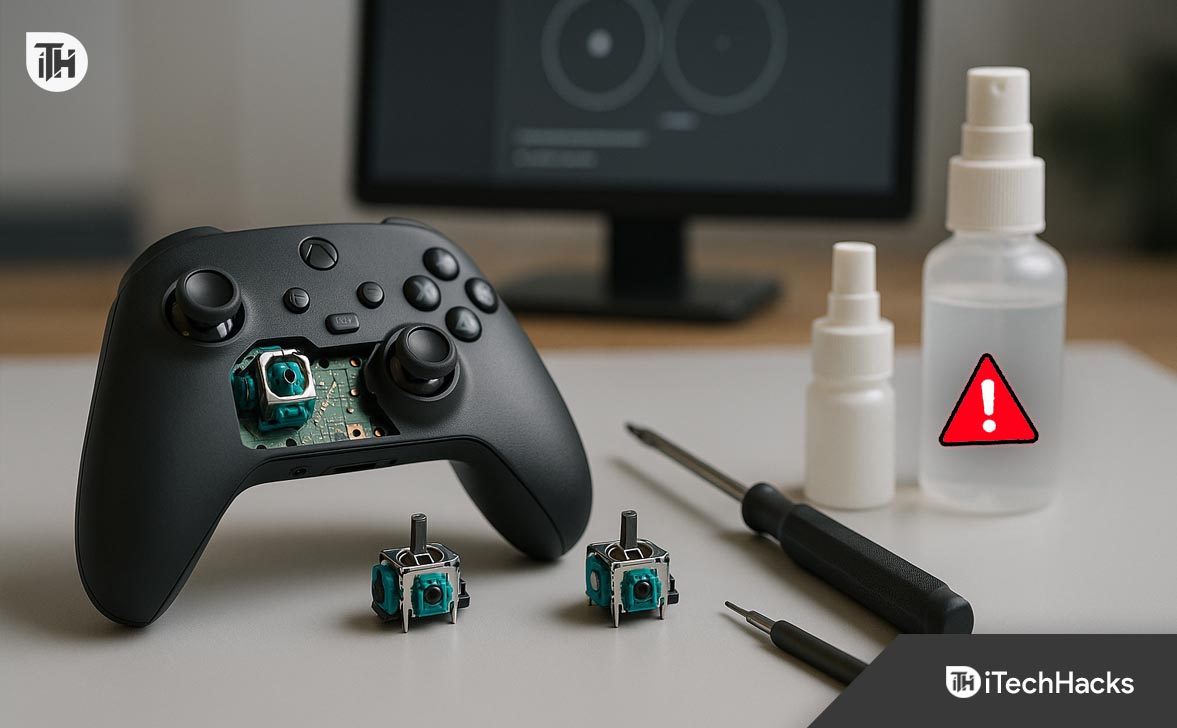
5. Open the Controller and Deep Clean Internally
If surface cleaning fails, internal cleaning is your next step—especially if the controller is out of warranty.
Tools Needed:
- T8H and T6 Torx security screwdrivers
- Plastic spudger or prying tool
- Isopropyl alcohol
- Clean anti-static work surface
Steps:
- Remove the battery cover and sticker to access hidden screws.
- Use the T8H screwdriver to remove all back panel screws.
- Carefully lift the shell open using a plastic prying tool.
- Remove the faceplate and pull off analog stick caps.
- Clean the potentiometer housings using a swab and alcohol.
- Reassemble the controller and test.
Caution: Avoid damaging ribbon cables or flex circuits inside.
When to use this: This level of xbox stick drift fix is best for controllers that have been exposed to moisture, dropped, or heavily used over time.
6. Replace the Analog Stick Module (Permanent Hardware Fix)
If all cleaning methods fail, your analog stick’s potentiometer has likely worn out. Replacing the joystick module is the most reliable long-term solution.
Tools Needed:
- Soldering iron with fine tip
- Solder wick and desoldering pump
- Flux and lead-free solder
- New Xbox-compatible joystick module (ALPS RKJXV or OEM equivalent)
Steps:
- Fully disassemble the controller and remove the motherboard.
- Locate the joystick module solder points (typically 14+ pins).
- Desolder each point carefully without lifting pads.
- Remove the old stick module.
- Insert and solder the new joystick module into place.
- Reassemble the controller and test calibration in Xbox Accessories App.
Professional Tip: Use a temperature-controlled soldering station set around 350–370°C. Poor soldering technique can permanently damage the board.
Why it works: This is the most complete answer to how to fix xbox controller drift when dealing with hardware failure. You’re replacing the failing part entirely, not masking the issue.
7. Use Third-Party Accessories to Adjust Deadzones
If repair isn’t an option, external devices or advanced controllers can offer tuning options that compensate for drift.
- Brook Wingman XB: Lets you set custom deadzones via firmware.
- SCUF Instinct Pro or PowerA Fusion Pro: Offer tunable trigger stops and tighter stick tolerances.
Limitation: These don’t fix the underlying issue, but they’re a useful workaround when a full repair isn’t viable.
8. Request a Warranty Replacement (Microsoft Support)
In 2025, Xbox controllers come with a 1-year warranty, and stick drift is a recognized fault.
- Visit support.xbox.com and sign into your Microsoft account.
- Register your device if not already.
- Submit a service request for controller replacement.
Turnaround time: 7–14 business days.
Tip: Do not open your controller before requesting service, or it may be denied due to voided warranty.
9. Use In-Game Deadzone Settings to Mask Minor Drift
Most modern games include advanced controller sensitivity and deadzone controls.
- Call of Duty / Warzone: Adjust both vertical and horizontal stick deadzones.
- Fortnite: Offers precise sensitivity and deadzone sliders.
- FIFA: Has analog response tuning.
How to use: Increase the deadzone slightly until drift stops. This won’t fix the issue, but it can hide it well enough for casual gaming.
10. Avoid DIY Drift Mods (Risky and Unstable)
Some users try firmware mods, physical resistors, or analog stick foil tweaks. These methods are risky, often unstable, and may result in bans from online multiplayer platforms.
Unless you’re experienced with microcontroller-level modding, do not attempt these solutions.
Frequently Asked Questions (FAQs)
1. What causes stick drift on an Xbox controller?
Stick drift is usually caused by worn-out potentiometers inside the analog stick, dust or debris buildup, or calibration issues. Heavy gaming over time accelerates wear, especially in FPS or racing games where analog input is constant.
2. Can I fix Xbox controller drift without opening it?
Yes. Many users solve early-stage drift using contact cleaner or isopropyl alcohol applied externally around the analog stick. These methods are safe and often effective for minor drift.
3. Is there a permanent fix for Xbox stick drift?
Yes. Replacing the joystick module with a new part is the only permanent fix. All other methods—cleaning, calibration, or software deadzone adjustments—are temporary or partial workarounds.
4. How do I know if my controller is under warranty?
Visit support.xbox.com, log in with your Microsoft account, and register your device. The system will display warranty status and allow you to file a service request if eligible.
5. Do Elite Series 2 controllers have more drift problems?
In our repair experience, Elite controllers often experience drift earlier than standard models due to heavier usage by competitive players and tighter analog sensitivity.
Conclusion
Xbox stick drift isn’t just annoying, it can ruin your gameplay. The good news is that it’s often fixable. Start with software calibration and cleaning methods. If the problem persists, replacing the joystick module is the most reliable long-term solution.
Whether you’re troubleshooting at home or planning a full repair, this guide gives you everything you need to handle how to fix Xbox controller drift confidently.
ALSO READ:
- Fix: Exoprimal Server Error Mr 0020002000 on PS5 and Xbox
- How to Activate Syfy.com Code Roku, Fire TV, Apple TV, Xbox One, Android
- 14 Ways to Fix Overwatch 2 Crashing, Freezing, Stuttering PC, Xbox, PS4, PS5
- Activate Bravo TV at bravotv link on Roku, Fire TV, Xbox, Apple TV
- 7 Ways to Fix Xbox Game Bar Not Working Error

![Fix Phone Screen Unresponsive Touch on Android & iPhone [Step-by-Step]](https://itechhacks.com/wp-content/uploads/2025/10/Fix-Phone-Screen-Unresponsive-Touch-150x150.jpg "Fix Phone Screen Unresponsive Touch on Android & iPhone [Step-by-Step]")