- Apple released the MacBook Neo in 2026, priced at ₹69,900 (or $599) with features like the A18 Pro chip, colorful options, and optimized for students, but students can get a notable education discount, lowering it to ₹59,900 (or $499).
- Eligible individuals such as current or new university students, parents buying for students, and educational staff can access the discount through UNiDAYS online verification or by showing valid documentation at authorized resellers.
- To maximize savings, students can utilize Apple's "Back to School" promotions, stack discounts with bank cashbacks at physical stores, and trade in older devices for additional reductions, making the MacBook Neo an affordable and efficient choice for educational use.
Apple has completely disrupted the entry-level laptop market this year with the highly anticipated release of the MacBook Neo. Launched in March 2026 at an aggressive starting price of ₹69,900 (or $599 in the United States), it is the most affordable notebook Apple has produced in nearly two decades. Powered by the incredibly efficient A18 Pro chip, the exact same silicon architecture found in the flagship iPhone 16 Pro, and available in vibrant, playful colors like Citrus, Indigo, Blush, and Silver, it is a machine practically tailor-made for modern campus life.
However, just because it is already Apple’s most budget-friendly laptop does not mean you should willingly pay the full retail price. If you are heading to college, sitting in a university lecture hall, or teaching in a classroom, you can significantly lower that initial price tag. Knowing exactly How to Get Student Discount on MacBook Neo is one of the smartest financial moves you can make before the semester begins, potentially saving you thousands of rupees and unlocking premium accessories in the process.
This comprehensive guide will walk you through exactly who qualifies for academic pricing, how to navigate the strict online verification systems, the key differences between buying online versus in-store, and how to aggressively maximize your total savings.
Apple Education Pricing Program
First, it is vital to understand that Apple has a long-standing tradition of offering educational pricing. This is not a temporary weekend sale or a fleeting holiday promotion; it is a permanent, year-round pricing tier available strictly to the verified academic community.
With the release of the MacBook Neo, Apple has introduced one of its steepest educational discounts to date by percentage.
- Standard Base Price: ₹69,900 (or $599)
- Education Base Price: ₹59,900 (or $499)
Saving a massive ₹10,000 right off the bat is an incredible advantage for a student on a strict budget. Furthermore, the true power of the educational discount is that it applies to almost everything else in your digital cart. The discount applies to hardware upgrades (such as bumping your storage from 256GB up to 512GB to get the Touch ID sensor), it gives you an automatic 20% off the extended AppleCare+ warranty protection, and it drops the price of first-party accessories. When you stack all of these components together, the total savings become highly substantial.
Who is Actually Eligible for the Discount?
Before diving into the technical steps, you need to ensure you actually meet Apple’s strict eligibility criteria. The program is generous, but the gates are heavily guarded by verification software.
The following individuals are officially eligible:
- Current University and College Students: Anyone currently enrolled in a recognized higher education institution, including bachelor’s, master’s, and Ph.D. programs.
- Newly Accepted Students: If you have received your official university acceptance letter but have not yet attended your first freshman class, you are still eligible to buy your gear for the upcoming year.
- Parents Buying for Students: Parents can make the purchase on behalf of their child, provided they can supply the child’s valid university documentation during the verification process.
- Teachers and Educational Staff: This is a frequently overlooked category. Any direct employee of a K-12 school, college, or university—ranging from a kindergarten teacher to a university board member or campus maintenance staff—qualifies for the exact same discount.
How Students Can Get MacBook Neo at a Discount in 2026 (Apple Education Store Guide)
Note: High school students buying for themselves do not officially qualify for the discount under Apple’s standard terms, though their schools and their teachers absolutely do.
1. Purchasing Online via Apple’s Education Store (UNiDAYS)
If you prefer the seamless convenience of having your new Citrus or Indigo MacBook Neo delivered directly to your doorstep, you will need to use Apple’s official online Education Store. Apple partners exclusively with a third-party verification service called UNiDAYS to confirm your academic status.
For those wondering How to Get Student Discount on MacBook Neo through the official website, here is the exact step-by-step online process:
Step 1: Navigate to the Education Portal
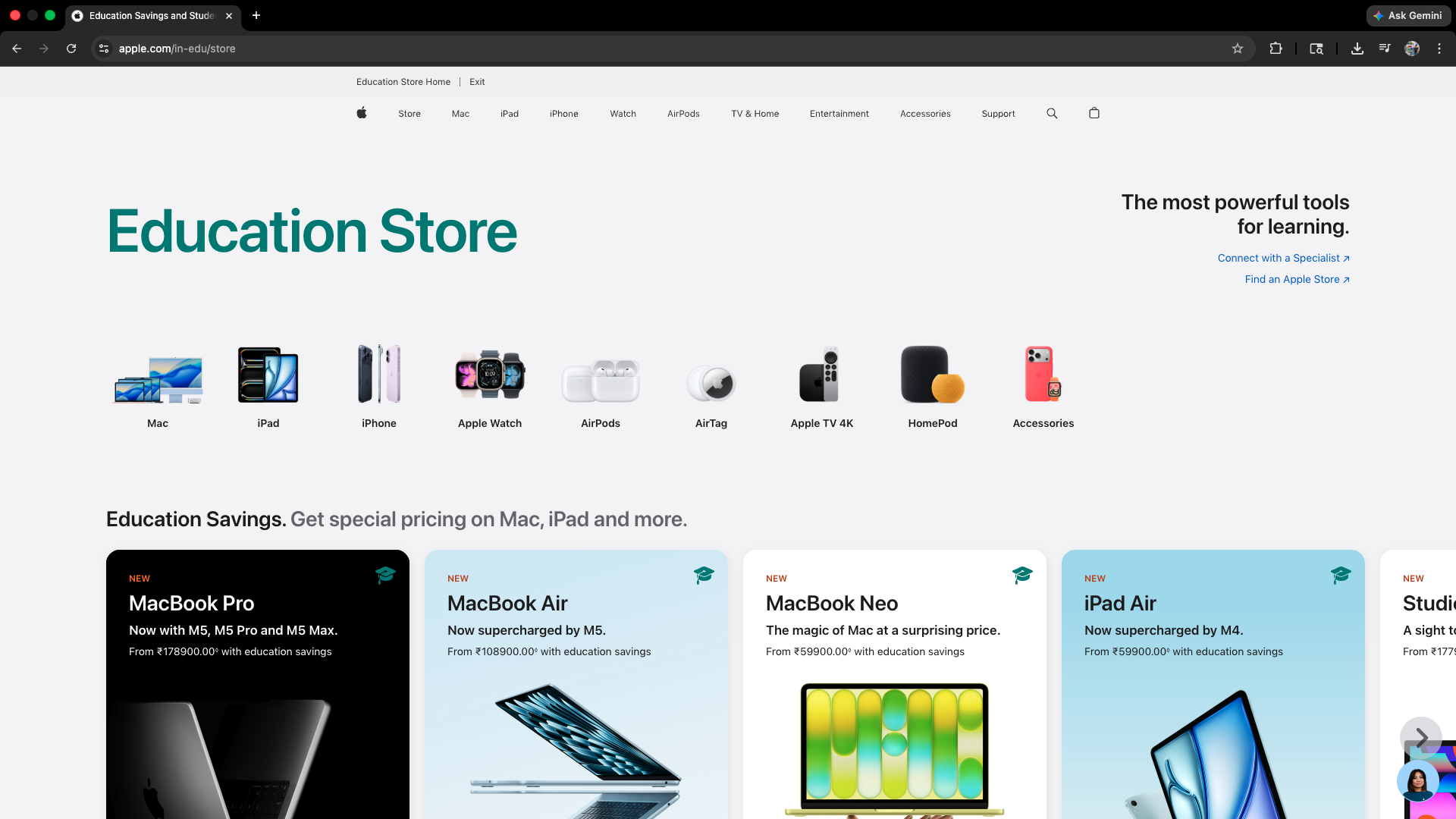
Do not go to the standard Apple homepage to start adding items to your cart. Scroll down to the very bottom footer of the Apple website and click on “Shop for College,” or search directly for the “Apple Education Store” portal in your region. You will immediately notice that the prices displayed on this specific storefront are lower than the standard retail store.
Step 2: The UNiDAYS Verification Process
When you attempt to click “Buy” or add the MacBook Neo to your digital cart, you will be abruptly redirected to the UNiDAYS portal.
- You will first need to create a UNiDAYS account using your personal email address.
- Next, you must verify your active student status. The absolute fastest way to do this is by entering your institution’s official student email address (usually ending in .edu or .ac.in). UNiDAYS will immediately send a verification link to that inbox.
- Troubleshooting: If your school does not provide a student email, or if the automated system fails, do not panic. UNiDAYS allows you to manually upload a high-resolution photo of your physical student ID card (which must clearly show the current academic year) or an official university enrollment letter. Manual verification is reviewed by a human and can take up to 24 to 48 hours to process.
Step 3: Configure and Checkout
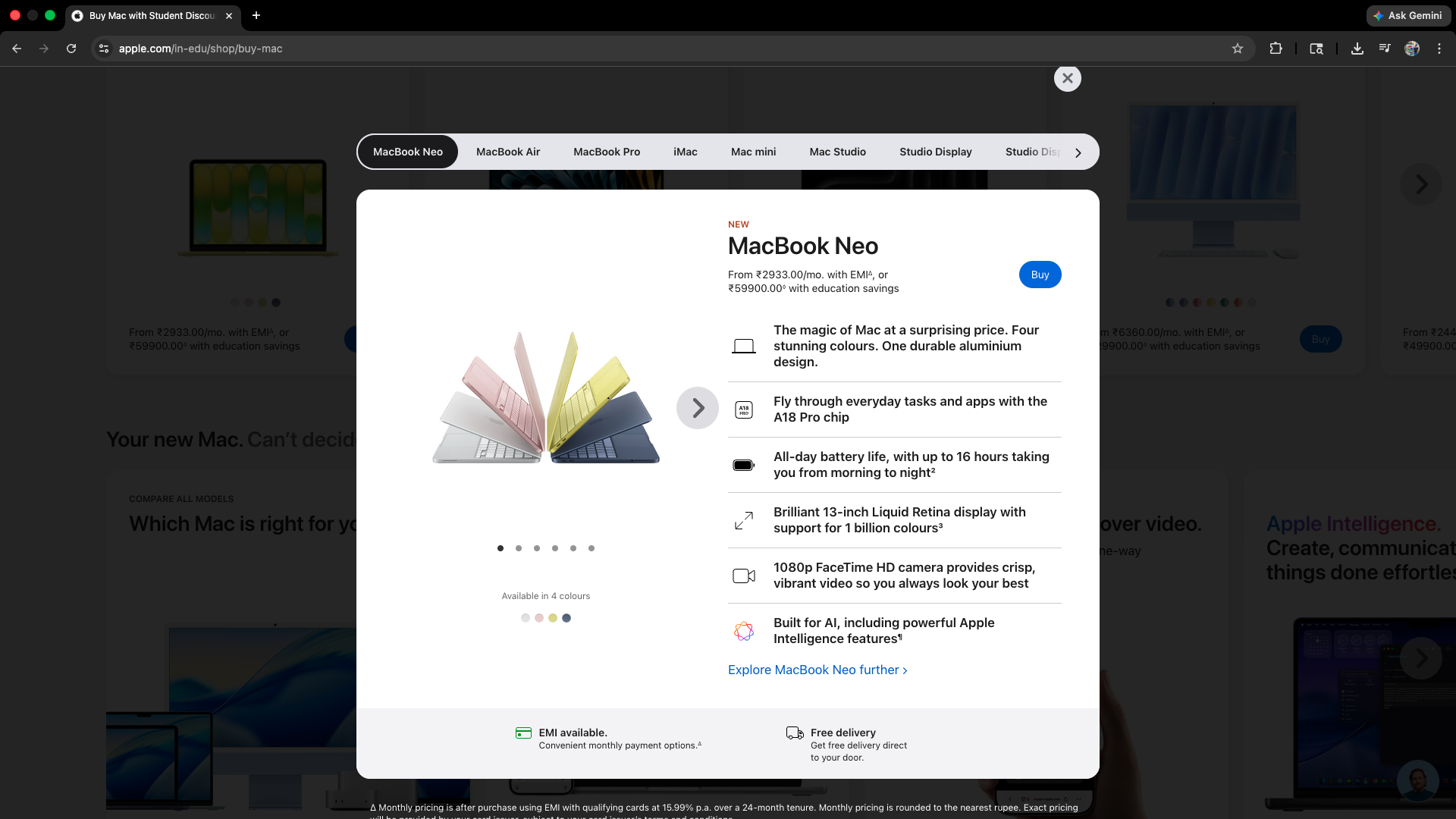
Once UNiDAYS verifies your account, you will be kicked back to the Apple Store, and the checkout gate will be permanently unlocked for your session. You can now select your MacBook Neo configuration, apply your shipping details, and finalize the purchase at the ₹59,900 price point.
2. Purchasing Offline at Premium Resellers
In many regions, buyers vastly prefer to walk into a physical brick-and-mortar store to make high-value electronic purchases. Apple Authorized Premium Resellers (such as Unicorn, iPlanet, or Imagine stores) offer the exact same educational discounts, and highly crucially, they often offer even better deals by stacking localized bank cashbacks.
If you want to know How to Get Student Discount on MacBook Neo at a physical retail store, the process is decidedly more analog but almost always more financially rewarding.
Step 1: Gather Your Physical Documents
You cannot simply walk into a store, point to a MacBook Neo, and verbally claim you are a student. You must bring hard, verifiable evidence with you.
- Bring your original, physical Student ID card.
- Bring a valid Government ID (like an Aadhaar card, PAN card, or driver’s license) that perfectly matches the name printed on the student ID.
- Many retail chains will also require you to fill out and sign a physical “Education Program Consent Form” directly at the checkout counter to maintain their compliance with Apple’s corporate auditing rules.
Step 2: Stack the Cashbacks
This is where offline retail truly shines. While the Apple online store gives you the standard ₹10,000 education discount, physical retailers frequently partner with major national banks (like HDFC, ICICI, or SBI) to offer massive instant cashbacks on credit card purchases.
For example, the MacBook Neo student price is ₹59,900. The physical retailer might then apply an HDFC flat ₹4,000 instant cashback to your credit card swipe, bringing your net effective price down to an incredible ₹55,900.
The “Back to School” Promotion
If you want to absolutely maximize your total value, timing is everything. Securing the discount is only half the battle; knowing exactly when to execute the purchase is the true secret of the Apple ecosystem.
Every single year, Apple runs a highly anticipated “Back to School” promotion. In the Northern Hemisphere (including the US, Europe, and India), this massive promotional window typically runs from late June through the end of September.
During this window, Apple aggressively supercharges the education discount. Not only do you get the ₹10,000 off the retail price of the MacBook Neo, but Apple also bundles a free pair of AirPods with your computer purchase.
- The Promo Mechanics: Technically, Apple adds the AirPods to your digital cart alongside the laptop, and then applies a promotional credit equal to their exact retail value at the checkout screen, making them entirely free.
- Upgrading the Audio: If the promotion officially offers the base AirPods 4 for free, but you really want the premium AirPods Pro 2 with Active Noise Cancellation, Apple allows you to simply pay the difference in price between the two models.
If you are reading this guide in April or May and your current laptop is still functioning properly, hold off on your purchase. Waiting for the Back to School promo to kick in during the summer is the smartest financial decision you can make. Even if you do not want the AirPods, you can sell the sealed, brand-new headphones on the secondary market to subsidize the cost of your MacBook Neo even further.
Is the MacBook Neo the Right Machine for Your Major?
Before you learn how to get a student discount on MacBook Neo, you must evaluate if the machine actually fits your academic workload. You are paying a budget price, which means Apple has made very strategic, deliberate compromises to hit that ₹69,900 mark.
- The A18 Pro Chip and Memory: The Neo utilizes the 3nm A18 Pro chip with an aluminum heat dissipator (no fans), paired with 8GB of unified memory. It will absolutely fly through daily tasks like heavy web browsing, writing essays in Microsoft Word, building complex presentations, and engaging in massive Zoom seminars. However, if you are a computer science major needing to run heavy virtual machines, or a film student editing massive multi-cam 4K timelines, you will inevitably hit a frustrating performance ceiling.
- The Keyboard and Hardware Constraints: The Neo features a fantastic chiclet keyboard that aesthetically matches the laptop’s exterior color, but it is completely unlit. There is no backlight whatsoever, meaning late-night typing sessions in a dark dorm room will absolutely require an external desk lamp. Furthermore, the base 256GB model completely lacks the Touch ID fingerprint sensor (featuring a standard Lock Key instead), meaning you will have to type your system password manually. To get Touch ID, you must upgrade to the 512GB tier.
- Port Limitations: You only get two USB-C ports and a standard 3.5mm headphone jack. More importantly, only one of those ports supports high-speed USB 10Gbps data transfers and DisplayPort 1.4 video output, while the other is restricted to older USB 2.0 speeds.
If your major consists primarily of research, writing, media consumption, and light multitasking, the Neo is a masterpiece of budget engineering. If your major requires heavy rendering, you should highly consider using your student discount on the more powerful MacBook Air M5 or MacBook Pro instead.
Stacking Discounts with Apple Trade-In
If you want to lower the entry price even further, do not let your old hardware gather dust in a desk drawer. Apple’s official Trade-In program is excellent, and it can be stacked simultaneously with the student discount online and in physical stores.
When you configure your MacBook Neo on the Apple Education Store, you will see an option to trade in an older device. Apple accepts older Intel MacBooks, aging iPads, iPhones, and even a wide variety of Windows laptops and Android smartphones. You simply input your old device’s serial number, and Apple generates an estimated trade-in value. Once you buy the new laptop, Apple sends a courier to pick up your old device and refunds the trade-in value directly back to your original payment method.
Conclusion
The introduction of the MacBook Neo in 2026 has fundamentally changed the landscape of campus technology. By bringing Apple’s legendary aluminum build quality, the incredibly smooth macOS operating system, and a highly capable processor down to a truly accessible price point, the Neo is poised to become the absolute default laptop for students worldwide.
Now that you understand How to Get Student Discount on MacBook Neo, you are fully equipped to navigate the UNiDAYS online verification process or leverage offline retail cashbacks to your distinct advantage. Whether you are typing up a quick assignment in the campus library or carrying its ultra-light 1.2kg frame across the quad, securing this machine at its lowest possible price is the perfect way to kick off a successful and highly productive academic year.
ALSO READ:
- Mac Camera Not Working After Update? 16 Proven Fixes for MacBook & iMac
- How to Factory Reset MacBook Air in 2026 (Step-by-Step for M1, M2, M3 & Intel)
- How to Unlock MacBook Pro Without Password or Apple ID 2026
- How to Fix Macbook Air Won’t Turn on in 2026
- Is AppleCare Worth for MacBook Pro/Air or iPhone in 2026?