- In 2026, Google Gemini AI Pro, a powerful tool for coding, writing, and data analysis, is costly at $20 per month, but there are ways to access it for free. Methods include exclusive deals like Jio partnerships in India, Google AI Studio for developers, Pixel phone purchase bundles, student editions, corporate trials, and family sharing plans.
- The advanced features of Gemini Pro, such as large context windows, complex reasoning, Python execution, and platform integration, are highly beneficial for handling extensive data and executing tasks effectively that the standard version cannot manage.
In 2026, access to frontier AI subscriptions like Google’s Gemini AI Pro is no longer a luxury—it is a competitive advantage for coding, writing, and complex data analysis. However, the “Google AI Premium” subscription, priced at roughly $20/month (or ₹1,950/month in India), is a significant cost that not everyone is ready to bear.
If you are searching for this article, you want to unlock the superior reasoning capabilities, massive context windows, and native Python execution of the latest Gemini 3 models without the recurring bill. This guide covers every legitimate method to access Google’s most powerful AI models for free in 2026, from hidden developer tools to exclusive carrier bundles.
Why You Want Gemini Advanced (Pro)
Before jumping into the “how,” it is crucial to understand why the free version of Gemini (usually running on the “Flash” model) might not be enough. The standard version is excellent for quick emails or basic summaries, but the Pro/Advanced tier unlocks the true “brain” of Google’s research.
- Massive Context Window: The Pro models can process up to 2 million tokens in a single prompt. This means you can upload a PDF of an entire textbook, a codebase with 50,000 lines of code, or a video file up to an hour long, and ask specific questions about it.
- Complex Reasoning: While standard models “guess” answers based on patterns, Gemini Advanced excels at “Chain of Thought” reasoning. It can break down multi-step math problems or logic puzzles that stump smaller models.
- Python Execution: One of the killer features in 2026 is the ability to write and run Python code internally. If you ask Gemini to “Analyze this spreadsheet,” it doesn’t just guess; it writes a Python script, runs it on the data, and gives you a mathematically accurate answer.
- Native Integration: The Advanced tier integrates directly into Google Docs, Gmail, and Slides, allowing you to “summon” the AI to write entire sections of a report based on your other Drive files.
Method 1: The Jio “Welcome Offer” (Exclusive to India)
If you are reading this from India, you are in luck. In arguably the most aggressive move to democratize AI, Reliance Jio has partnered with Google to bundle Gemini Advanced with its 5G plans. This is currently one of the easiest ways to get the service for free.
In late 2025 and continuing into 2026, Jio announced a partnership to offer up to 18 months of Google AI Pro (Gemini Advanced) for free to eligible subscribers. This deal is valued at approximately ₹35,100.
Eligibility Criteria
To qualify for this massive bundle, you generally need to meet the following criteria:
- Jio Subscriber: You must be an active user of Reliance Jio (Prepaid or Postpaid).
- Unlimited 5G Plan: You must be on a plan that includes “Unlimited 5G Data.” Typically, these are the plans priced at ₹349 and above.
- Device: You need an Android device to claim the offer initially (though the account works on iOS/Web once activated).
Step-by-Step Guide to Claim
- Ensure you have the latest version of the MyJio app installed on your phone.
- Open the app and look for a banner labeled “Google Gemini Offer” or “Claim Your Free AI Pro Subscription.”

- If you don’t see a “Claim Now” button, you might see a “Register Interest” button. Tap it. Jio is rolling this out in waves, often prioritizing users aged 18–25 first, before opening it to the wider user base.
- Once eligible, clicking the link will redirect you to a Google One activation page. You will need to sign in with your primary Gmail account.
- The offer doesn’t just give you the AI; it typically includes the 2TB Google One AI Premium plan, meaning you get the cloud storage benefit as well.
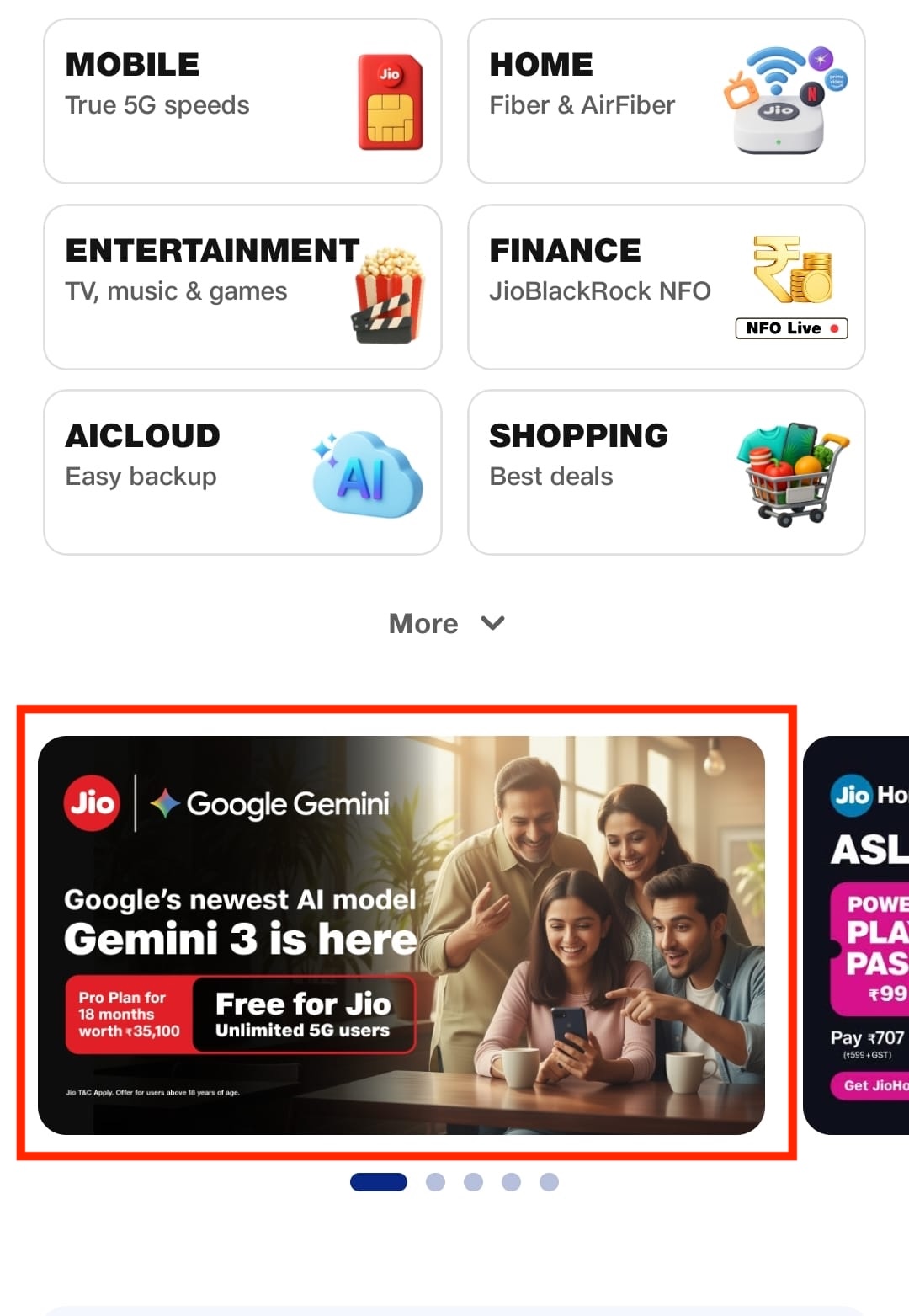
Note: If you stop your Jio 5G recharge, the subscription may be paused or cancelled, so ensure you keep your mobile plan active.
Method 2: The Google AI Studio “Hack” (Best for Power Users)
Most people don’t know that Google offers a “Developer” interface that is completely separate from the consumer gemini.google.com app. It is called Google AI Studio, and it is the best-kept secret in the AI world.
Google wants developers to build apps using their models, so they offer a generous Free Tier for their API. This interface allows you to chat with the absolute latest models (like Gemini 2.5 Pro or Gemini 3.0 Pro Experimental) for free, without a subscription.
Why is this free?
Google uses this tier to let developers test the models. In exchange for free access, you generally agree that your inputs can be used to improve the model (unlike the paid Enterprise API). For 99% of personal users, this is a fair trade-off.
How to access it:
- Go to Google AI Studio and sign in with your Google account.
- You will need to agree to the terms of service (indicating you are a developer, though no proof is required).
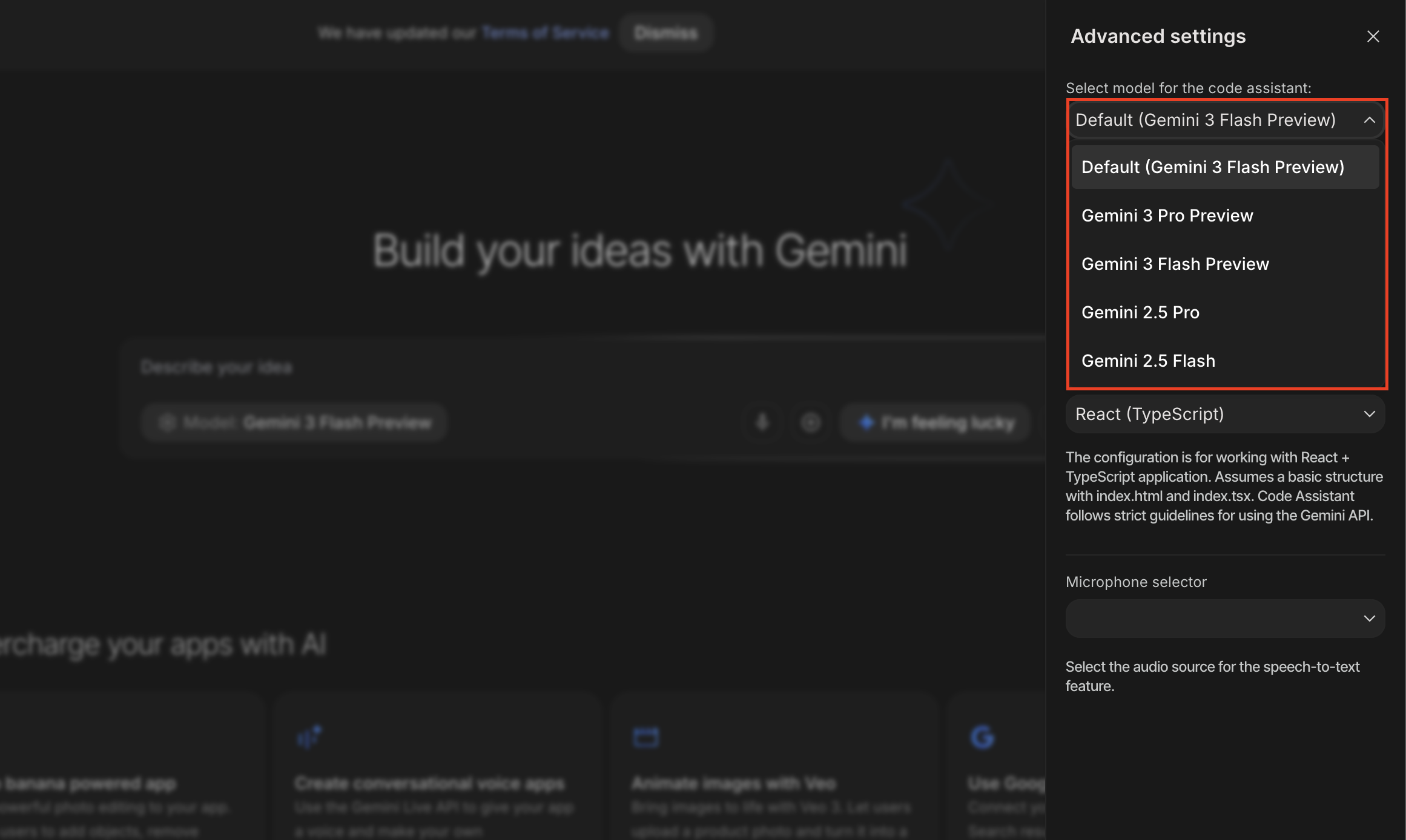
- Click the “Model” dropdown.

- From here, select models like Gemini 3 Pro Preview, Gemini 3 Flash, etc.

- Once selected, simply type your query in the prompt box to begin using the model immediately.

The Limits
In 2026, the free tier usually allows for roughly 50 requests per day on the Pro models. For a typical user who just needs help with a few emails or a coding problem, this is more than enough. If you hit the limit, you can switch to the “Flash” model, which has a much higher daily limit.
Method 3: The “Pixel” Hardware Bundle (12 Months Free)
If you are in the market for a new phone, this is the most seamless way to get Gemini Advanced for a long period. Google aggressively bundles its AI subscription with its flagship hardware to compete with Apple’s ecosystem.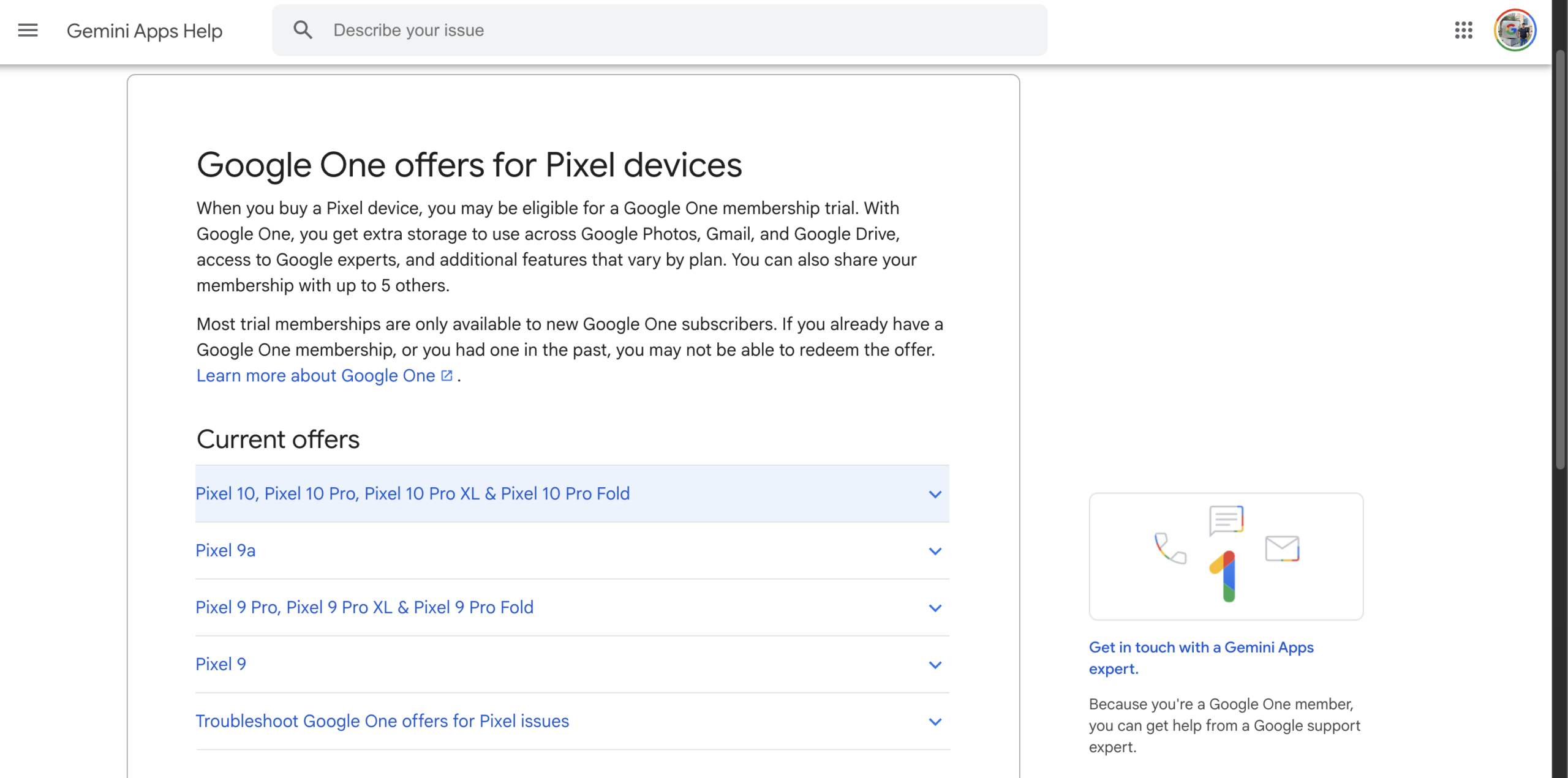
In 2026, the Pixel 9a, Pixel 9, Pixel 9 Pro, Pixel 9 Pro XL, Pixel 9 Pro Fold, Pixel 10 Pro, Pixel 10 Pro XL, and the Pixel 10 Fold come with a 1-year free trial of the Google One AI Premium plan.
How to redeem:
- Purchase and Activate: Buy a new eligible Pixel device and sign in with your primary Google account during the setup process.
- Open the Gemini App: Launch the pre-installed Gemini app.
- Look for the Offer: You should see a “Claim your 12 months of Gemini Advanced” banner on the home screen.
- Check Google One: If it doesn’t appear in Gemini, open the Google One app, go to “Benefits,” and look for the trial there.
- Activate: Confirm the subscription. You will usually need to add a payment method for auto-renewal, but you will not be charged until the 12 months are up.
Tip: Immediately set a reminder on your calendar for 360 days from now to cancel the subscription if you do not wish to pay the renewal fee.
Method 4: The Student Edition (12 Months Free)
Recognizing that students are the biggest adopters of AI for research, Google has rolled out specific “Google Cloud for Students” or “Gemini Education” initiatives in many regions.
How to check eligibility:
- Visit the Education Portal: Search for “Google Cloud Skills Boost for Students” or “Gemini Student Benefits.”
- Verify with SheerID: Google typically uses a third-party service like SheerID to verify your university email (.edu or equivalent).
- Claim the Credits: Once verified, you often get a pass that grants access to Gemini Advanced features tailored for academic use. This includes enhanced NotebookLM limits, which is invaluable for uploading 20 PDF research papers and having the AI synthesize a literature review.
- Note: This plan is strictly for educational purposes and may restrict some commercial usage rights.
Method 5: Google Workspace Labs (Corporate/Business)
If you work for a company that uses Google Workspace (Gmail, Drive, Docs for business), your administrator might already have access to Gemini without you realizing it.
Google often allows Workspace admins to enable “Gemini Business” or “Gemini Enterprise” trials for their domain.
How to activate:
- Ask your Admin: Contact your IT department and ask if the “Gemini for Google Workspace” add-on is available for your account.
- Check Side Panels: Open a Google Doc or Gmail. Look for the “Ask Gemini” (sparkle/star icon) in the top right corner of the toolbar.
- Use It: If the icon is there, you already have access to the Pro-level models integrated directly into your workflow. You can use this to summarize long email chains or generate first drafts of documents without paying for a personal subscription.
Method 6: Family Sharing (The “Buddy System”)
The Google One AI Premium plan (2TB + Gemini Advanced) supports Family Sharing. This is often overlooked. One person pays for the subscription, but up to 5 other family members get the benefits at no extra cost.
If you have a friend, roommate, or family member who is already paying for the 2TB AI Premium plan, they can add you to their Google Family Group.
How to set it up:
- The Subscriber: Opens the Google One app -> Settings -> Family Settings -> Manage Google Family Members.
- Invite: They send an invite to your Gmail address.
- Accept: You accept the invite.
- Activate: Once in the group, open gemini.google.com. You should see the “Advanced” logo in the top corner, indicating you have been upgraded.
Privacy Note: Even in a family group, your chats remain private. The family manager cannot see your Gemini history or your personal files, only how much shared storage you are using.
Final Words
By doing so, you can access Google Gemini AI Pro for free in 2026. Following the steps mentioned in this article, you will be able to utilize the world’s most advanced multimodal AI models without breaking the bank. Whether you take advantage of the massive Jio partnership in India, use the Pixel hardware bundle, or simply log into Google AI Studio as a developer, high-tier AI is more accessible than ever. The barrier to entry for advanced AI is no longer money, it is simply knowing where to look.
ALSO READ:
- How to Fix Logitech K400 Plus Not Pairing to Bluetooth
- How to Turn Off Share with Copilot AI Feature in Windows 11
- How to Turn Off Google Chrome AI Features on Windows 11
- Pair Android Phone to Windows PC at aka.ms your-pc (2026)
- iPhone 17 Pro Signal Issues: How to Fix Network & Connectivity Problems